

Manuals of product BradyPrinter i5100

Editorial note
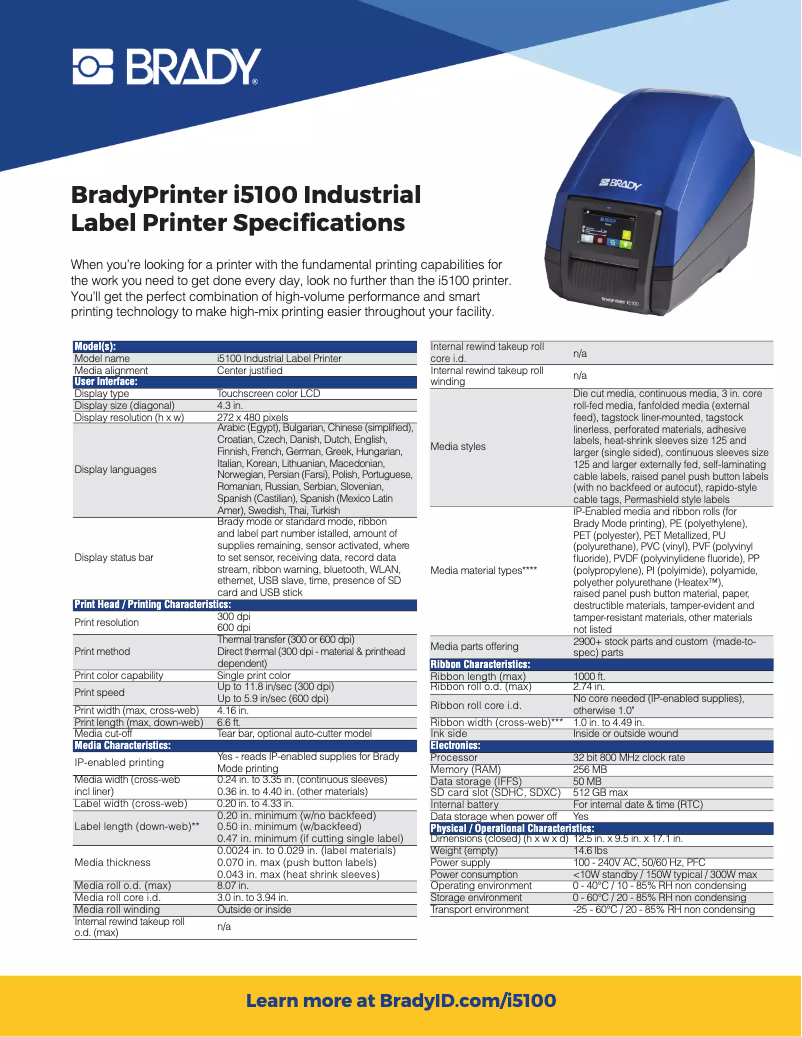
The BradyPrinter i5100 from the Brady brand is a printer that stands out for its optimal performance and ease of use. Thanks to its advanced technology, it allows for fast and high-quality prints, which helps improve efficiency at work. Its intuitive interface makes printing accessible even to novice users, which is a major asset in a professional environment. However, it is worth noting that the initial purchase cost is relatively high compared to other models on the market, which can be a barrier for small businesses or individual users. Additionally, limited compatibility with certain operating systems and software could restrict its use in varied environments. The versatility of the BradyPrinter i5100 allows it to adapt to various professional settings, but some advanced features may require a learning curve. Although the printer is generally reliable, its weight and size can complicate its movement, thus posing space issues in some offices. Regarding support, the availability of a user manual and a technical sheet makes it easier to get accustomed to the device, allowing users to quickly familiarize themselves with its features. In summary, the BradyPrinter i5100 is a solid investment for those seeking a high-performance printer, although some drawbacks related to its cost and portability should be taken into account.Score details
User experience
The user experience is very positive thanks to an intuitive interface that makes printing accessible even for inexperienced users.
Performance
The performance of the BradyPrinter i5100 is optimal, offering fast and high-quality printing that enhances workplace efficiency.
Value for money
The initial purchase cost is relatively high compared to other printers, which can be a barrier for small businesses.
Usability
The versatility of the printer makes it suitable for various professional environments, although some advanced features may require a learning curve.
Support
The availability of a user manual and a technical sheet allows users to quickly familiarize themselves with the device.
Robustness
Although the BradyPrinter i5100 is reliable, its weight and size can make it difficult to move, posing space issues in some offices.
Advantages
Fast and high-quality printing
Intuitive user interface
Brand's recognized reliability
Manual and documentation available
Suitable for various professional environments
Disadvantages
High purchase cost for small businesses
Limited compatibility with certain operating systems
Weight and size inconvenient for moving
High maintenance and consumable costs
Learning curve for advanced features
Technical Specifications BradyPrinter i5100
General Information
-
ModelBRADYPRINTER I5100
-
Brand
-
Category
-
Type
-
SKU1672501
-
MPN1672501
Frequently Asked Questions
What is the recommended method for removing jammed paper from the printer?
Why is my printer not recognizing the original cartridges?
What could be the reasons for poor print quality?
What is the difference between a laser printer and an inkjet printer?
Why is my inkjet printer leaving black streaks on my prints?
What does the acronym DPI mean?
Is the manual for the Brady BradyPrinter i5100 available in French?
Similar products


More product categories from brand Brady


Presentation of product BradyPrinter i5100 specifications from brand Brady
General Information
The Brady BradyPrinter i5100 is a printer from the Brady brand, known for its commitment to quality and innovation in the printing equipment sector. This model has been specifically designed to deliver high performance and a smooth user experience, making it a wise choice for various professional environments.
Advantages
The BradyPrinter i5100 stands out for its optimal performance, allowing for fast and high-quality printing, which helps improve work efficiency. Its intuitive design ensures ease of use, making printing accessible even for those who are not familiar with advanced technologies. Furthermore, the reputation for reliability associated with the Brady brand guarantees that this device is a safe investment, providing lasting results.
Users also benefit from comprehensive documentation support, including a user manual and a technical sheet, thus facilitating the handling of the printer. Its versatility makes it suitable for various professional settings, ranging from offices to workshops, which broadens its scope of application.
Disadvantages
However, it is important to note some disadvantages. The initial purchase cost can be relatively high compared to other printers available on the market, which may pose a challenge for small businesses or individual users. Additionally, the limited compatibility with certain operating systems or software may restrict its use in varied configurations.
The size and weight of the printer can also complicate its mobility, thus posing space issues in offices or workshops. The maintenance costs and consumables, such as ink cartridges and labels, can accumulate and impact the long-term budget. Finally, some advanced features may require a learning curve, representing a challenge for less experienced users.


