

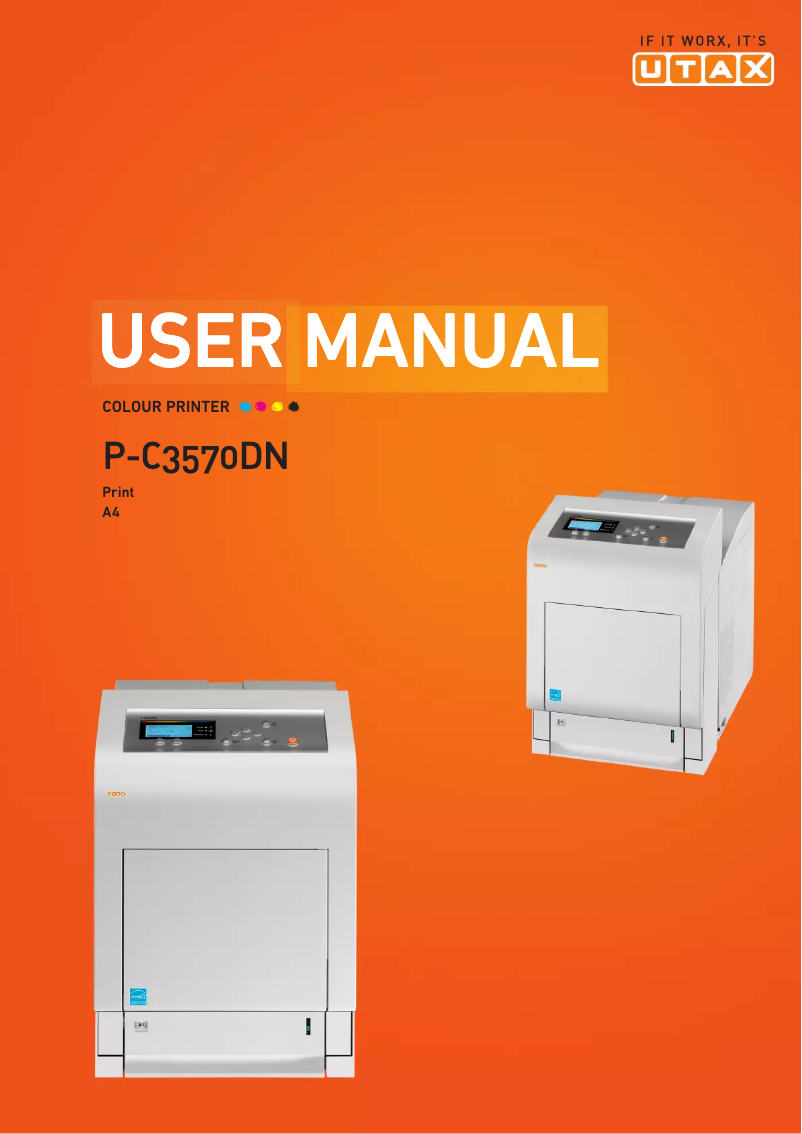
Manual of product P-C3570DN
Editorial note
The Utax P-C3570DN printer stands out with its impressive printing speed of 35 pages per minute, both in black and color, providing an efficient solution for everyday printing tasks. Its laser printing technology ensures exceptional quality with a maximum resolution of 9600 x 600 DPI, ideal for professional documents and presentations. Additionally, the built-in duplex printing feature contributes to paper savings, which is a plus for environmentally conscious users. Network connectivity via Ethernet/LAN facilitates integration into modern offices, and the 500-sheet paper capacity allows for handling a large volume of documents without interruption. However, some drawbacks are worth mentioning. The lack of Wi-Fi connectivity limits the ability to print wirelessly from mobile devices or laptops, which may be a hindrance for some users. Although the printing speed is satisfactory, the first page copy time of 8 seconds for black prints and 9 seconds for color may seem long for those seeking immediate responsiveness. Furthermore, the weight of 35 kg can pose challenges during installation in tight spaces, and the 500-sheet capacity may require frequent reloading in high-volume environments. In terms of scores, the user experience is generally positive, although the absence of Wi-Fi has been noted. The printer's performance is rated as good, but the first page copy time could be improved. The design is functional, but its weight may complicate installation. The value for money is excellent, and the available features are appreciated, despite the limitation in connectivity. Finally, the provided documentation is comprehensive, making the setup and use of the device easier.Score details
User experience
The user experience is overall positive, with an intuitive interface. However, the lack of Wi-Fi connectivity limits some modern features.
Performance
The printing speed of 35 ppm is impressive, but the first page copy time may seem long for users in a hurry.
Design
The design is functional and modern, but the weight of 35 kg can make installation difficult in tight spaces.
Value for money
The value for money is excellent thanks to the laser printing technology and the resolution of 9600 x 600 DPI.
Usability
Although the printer is easy to use, the 500-sheet paper capacity may require frequent refills for high-volume environments.
Features
Features such as duplex printing and Ethernet connectivity enhance efficiency, but the lack of Wi-Fi limits flexibility.
Documentation
The user manual is comprehensive with 255 pages, providing good assistance for setup and use.
Advantages
Fast printing up to 35 pages per minute
Print quality 9600 x 600 DPI
Built-in duplex printing
Easy Ethernet/LAN connectivity
500-sheet paper capacity
Disadvantages
No Wi-Fi connectivity.
Long first page copy time.
Insufficient power capacity.
Heavy weight, difficult to move.
Limited internal memory for heavy tasks.
Technical Specifications P-C3570DN
General Information
-
ModelP-C3570DN
-
Brand
-
Category
-
Type
-
SKU270690
-
MPN270690
Print speed
-
Double-sided printingYes
-
Maximum resolution9600 x 600 DPI
-
Double-sided printingYes
-
Printing technologyLaser
-
Duplex printing speed (color, normal quality, A4/US Letter)35 ppm
-
Duplex printing speed (color, normal quality, A4/US Letter)35 ppm
-
Color resolution600 x 600 DPI
-
Copy time for the first page (Black, normal)8 s
-
Copy time for the first page (color, normal)9 s
-
Duplex printing speed (color, normal quality, A4/US Letter)35 ppm
-
Duplex printing speed (color, normal quality, A4/US Letter)35 ppm
Features
-
Service cycle (Maximum)- pages per month
-
Number of print cartridges1
Input and output capacity
-
Total output capacity500 sheets
-
Paper feed typeCassette
-
Total output capacity500 sheets
Paper management
-
Maximum ISO A series paper sizeA4
-
Type of paper tray supportCut sheet metal
-
ISO, Format Series A (A0...A9)A4, A5, A6
-
Support weight supported in duplex mode60 - 120 g/m²
-
Weight of the multifunctional tray support60 - 220 g/m²
-
Support weight supported in duplex mode60 - 120 g/m²
-
Maximum print format216 x 356 mm
Network
-
Mobile printing technologies-
-
Ready-to-use networkYes
-
WifiNo
-
Ready-to-use networkYes
-
Management protocolsTCP/IP, Net BEUI
Connectivity
-
Standard interfacesUSB 2.0
Representation / realization
-
Internal memory512 MB
-
Memory locations1
-
Maximum internal memory1536 MB
-
Integrated into the processorYes
-
Sound pressure level (impression)48 dB
-
Sound power level (standby)36 dB
-
Processor frequency667 MHz
-
Processor familyPowerPC
-
Processor model465S
-
Integrated into the processorYes
Design
-
Product colorWhite
-
Built-in screenYes
-
ScreenLCD
Power
-
AC input voltage220 - 240 V
-
AC input frequency50 - 60 Hz
-
Average power consumption in Print mode622 W
-
Energy consumption (standby mode)86 W
-
Energy consumption (eco mode)37 W
-
Electricity consumption (stop)4 W
Sustainability
-
Sustainability certificatesENERGY STAR
Minimum system requirements
-
Support for the Windows operating systemWindows 2000
-
Support for other operating systemsWindows 7 Home Basic
-
Support for other operating systemsWindows 7 Home Basic x64
-
Support for the server operating systemWindows 7 Home Premium
-
Support for other operating systemsWindows 7 Home Premium x64
-
Windows 7 Professional
-
Windows 7 Professional x64
-
Windows 7 Starter
-
Windows 7 Starter x64
-
Windows 7 Ultimate
-
Windows 7 Ultimate x64
-
Windows Vista Business
-
Windows Vista Business x64
-
Windows Vista Enterprise
-
Windows Vista Enterprise x64
-
Windows Vista Home Basic
-
Windows Vista Home Basic x64
-
Windows Vista Home Premium
-
Windows Vista Home Premium x64
-
Windows Vista Ultimate
-
Windows Vista Ultimate x64
-
Windows XP Home
-
Windows XP Home x64
-
Windows XP Professional
-
Windows XP Professional x64
-
Yes
-
Yes
-
Windows Server 2003
-
Yes
Weight and dimensions
-
Width345 mm
-
Depth518 mm
-
Height512 mm
-
Weight35000 g
Frequently Asked Questions
What is the weight of the Utax P-C3570DN?
What is the best method to remove paper jammed in the printer?
Why is my printer not recognizing the original cartridges?
What could be the causes of poor print quality?
What is the difference between a laser printer and an inkjet printer?
Why does my inkjet printer leave black streaks on my prints?
What does the acronym DPI mean?
How many cartridges can be inserted into the Utax P-C3570DN?
What is the height of the Utax P-C3570DN?
What is the width of the Utax P-C3570DN?
What is the depth of the Utax P-C3570DN?
Is the manual for the Utax P-C3570DN available in French?
Similar products



More product categories from brand Utax
More product types from brand Utax

Presentation of product P-C3570DN specifications from brand Utax
General Information
The model Utax P-C3570DN is a printer from the brand Utax, known for its commitment to quality and innovation in the field of office equipment. This model, referenced under the code P-C3570DN | 4436503570, is designed to deliver remarkable performance and an optimized user experience.
Print Speed
This printer offers color printing, with a maximum resolution of 9600 x 600 DPI, ensuring results of exceptional clarity for professional documents. It can print up to 35 pages per minute in both black and color, making it particularly efficient for daily tasks. Additionally, the built-in duplex printing function helps save paper and reduce waste. In terms of timing, the first black page is printed in 8 seconds, while the color page takes 9 seconds.
Features
The maximum service cycle of the Utax P-C3570DN is designed to support intensive use, thus meeting the needs of demanding users. It operates with a single print cartridge, simplifying the management of consumables.
Input and Output Capacity
With a total feed capacity of 500 sheets, this printer is ideal for handling a large volume of documents without interruption. It uses a cassette feed system, ensuring efficient paper management. The output capacity is also 500 sheets, guaranteeing optimal performance.
Paper Management
The Utax P-C3570DN is compatible with ISO A series paper sizes, including A4, A5, and A6. It supports media from 60 to 120 g/m² for the paper tray and up to 220 g/m² for the multifunction tray, allowing for great printing flexibility. The maximum print size is 216 x 356 mm, ideal for larger documents.
Network
This printer is equipped with Ethernet/LAN connectivity, facilitating its integration into modern office environments. However, it does not have Wi-Fi connectivity, which may limit wireless printing from mobile devices. The network is ready to use, ensuring a quick connection upon startup.
Connectivity
The Utax P-C3570DN features standard interfaces to ensure optimal connectivity and facilitate integration with various devices.
Representation / Performance
With an internal memory of 512 MB and a maximum capacity of 1536 MB, this printer is well-equipped to store the data and applications necessary for its operation. It also includes a built-in memory card reader, allowing for direct file management. Its noise level during printing is 48 dB, ensuring discreet operation.
Design
The Utax P-C3570DN features a white finish, giving it a modern appearance. It is also equipped with an integrated LCD screen for intuitive use.
Power
This printer operates with an AC input voltage of 220 - 240 V and a frequency of 50 - 60 Hz. Its power consumption in print mode is 622 W, while it consumes 86 W in standby mode. In energy-saving mode, consumption is reduced to 37 W, and it only consumes 4 W when turned off.
Durability
The Utax P-C3570DN is certified ENERGY STAR, attesting to its energy efficiency and compliance with environmental standards.
Minimum System Requirements
This printer is compatible with various operating systems, including different versions of Windows, Mac, and Linux, thus ensuring flexibility of use in different computing environments.
Weight and Dimensions
The dimensions of the Utax P-C3570DN are 345 mm in width, 518 mm in depth, and 512 mm in height. With a weight of 35 kg, this printer may require special attention during installation in tight spaces.


