

Manuals of product MX-B427W
Editorial note
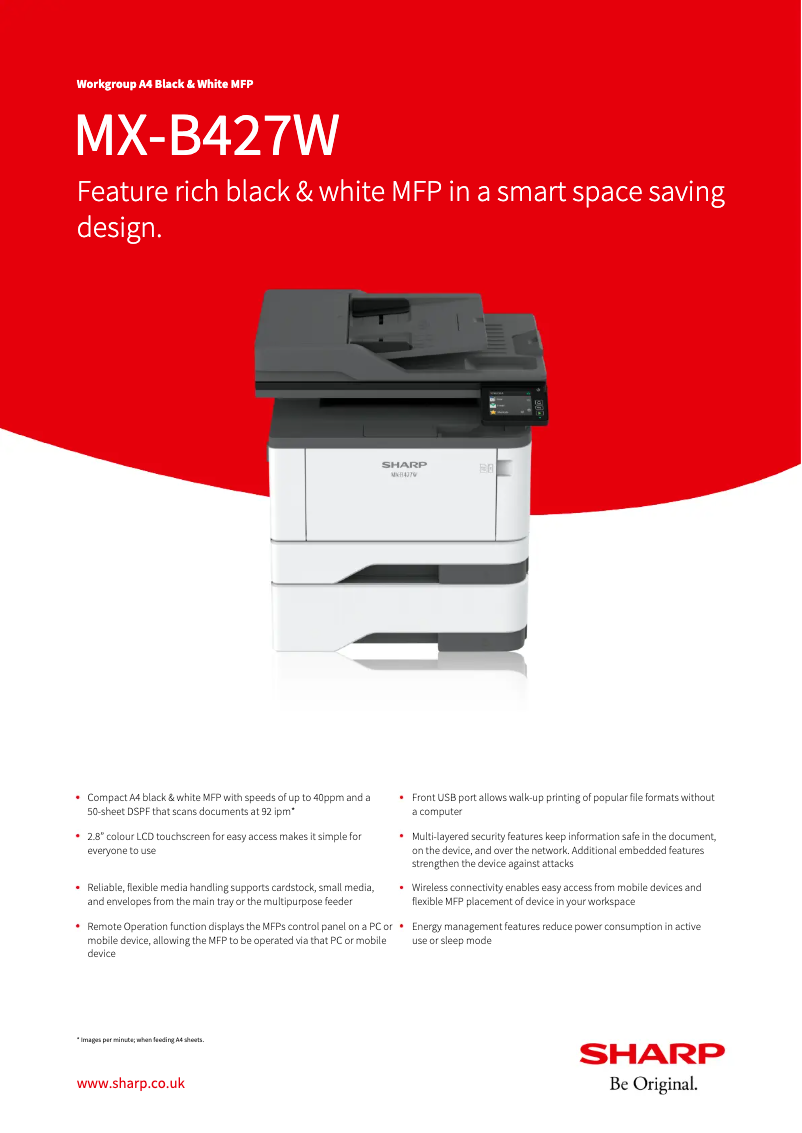
The Sharp MX-B427W is a printer that stands out for its exceptional print quality, delivering sharp and precise results, making it ideal for professional use. Its wireless connectivity feature allows for easy printing from various devices, adding to its versatility. Additionally, the presence of a user manual and a technical sheet facilitates handling and maintenance, thus providing a good level of support to users. However, some drawbacks must be taken into account. The initial purchase cost is relatively high, which may not suit all budgets. Furthermore, the cost of ink cartridges can increase long-term operating expenses. The model may also be considered bulky, which can pose problems in restricted workspaces. Finally, the user interface, while functional, may seem complex for those who are not familiar with advanced features. Overall, the Sharp MX-B427W is a robust and efficient printer, but it may require an initial investment and adaptation to its features for some users.Score details
User experience
The user experience is generally positive thanks to the availability of a user manual and a technical sheet, making it easier to get started. However, the interface may seem complex for some users.
Performance
The print quality is exceptional, providing sharp and accurate prints, ideal for professional use. The versatility of the printer allows it to handle different types of documents effectively.
Battery life
Although the printer is energy efficient, it is important to note that it is not battery-powered, but it optimizes energy consumption to reduce operating costs.
Design
The design is functional, but the model may be considered bulky and cumbersome, which can be an issue in tight workspaces.
Value for money
The initial purchase cost is relatively high, which may not suit all budgets. Additionally, the cost of ink cartridges increases the long-term operating costs.
Support
The availability of a user manual and a technical sheet provides a good level of support for users, making maintenance and use simpler.
Usability
Ease of use is enhanced by the available documents, but the user interface could confuse some users, especially those who are not familiar with advanced features.
Advantages
Clear and precise prints
Wireless printing from various devices
Ease of use and maintenance
Optimization of energy consumption
Suitable for various types of documents
Disadvantages
High initial purchase cost.
Bulky for small spaces.
High cost of toners.
Annoying noise level.
Complex user interface.
Technical Specifications MX-B427W
General Information
-
ModelMX-B427W
-
Brand
-
Category
-
Type
-
SKU1570514
-
MPN1570514
Frequently Asked Questions
What is the recommended method for removing jammed paper from the printer?
Why is my printer not recognizing the original cartridges?
What are the possible causes of poor print quality?
What is the difference between a laser printer and an inkjet printer?
Why is my inkjet printer leaving black streaks on prints?
What does the acronym DPI mean?
Is the manual for the Sharp MX-B427W available in French?
Similar products


More product categories from brand Sharp
Television and multimedia Sharp
Home appliances Sharp
Household appliances Sharp
Audio Sharp
Phones Sharp
Other Sharp
Interior Sharp
More product types from brand Sharp


Presentation of product MX-B427W specifications from brand Sharp
General Information
The Sharp MX-B427W printer is a device from the renowned brand Sharp, known for its commitment to quality and innovation in the printing technology sector. This model, the MX-B427W, is designed to deliver superior performance, ensuring a smooth and efficient user experience.
Advantages
- Exceptional print quality: The Sharp MX-B427W produces prints with remarkable clarity, ideal for professional documents as well as visually impactful presentations.
- Wireless connectivity: With its built-in Wi-Fi functionality, this printer allows for easy printing from various devices such as computers, smartphones, and tablets, thus facilitating sharing and access.
- Ease of use: With a user manual and a technical sheet available, the setup and maintenance of the printer are simplified, making the device accessible to all users, even those with less experience.
- Energy efficiency: The MX-B427W model is designed to minimize energy consumption, which helps reduce operating costs while having a positive impact on the environment.
- Versatility: This printer adapts to various types of documents, making it suitable for both personal and professional use in different work environments.
Disadvantages
- Initial purchase cost: The acquisition price of the Sharp MX-B427W may be high compared to other similar models, which could pose a problem for some budgets.
- Bulkiness: Its relatively large size can be a disadvantage in restricted workspaces.
- Consumable costs: Ink cartridges and toners can be expensive, increasing the long-term operating costs of the printer.
- Noise level: The operation of the printer may be perceived as loud, which can be disruptive in quiet environments.
- User interface: Some users, particularly those less familiar with advanced technologies, may find the user interface complex to navigate.


