

Manual of product Xpress SL-C1860FW
Editorial note
The Samsung Xpress SL-C1860FW printer stands out for its impressive performance, offering a printing speed of 18 pages per minute in both color and black and a maximum resolution of 9600 x 600 DPI, ensuring high-quality prints. Its wireless connectivity allows for easy printing from mobile devices, which is a major advantage for modern users. Additionally, its color scanning and copying features enhance its versatility, making it an interesting choice for professional environments. However, the printer has some drawbacks. The duplex printing mode is manual, which can slow down the process for those who frequently print double-sided documents. Furthermore, the paper tray capacity is limited to 250 sheets, requiring frequent reloads during heavy use. Its weight of 21.44 kg can also complicate moving and installation, especially in tight workspaces. Finally, the lack of an integrated memory card reader limits some connectivity options. Regarding performance scores, the printer receives high marks in several areas, such as performance (85) and user experience (80), reflecting its reliability and quality. However, aspects like ease of use (70) and value for money (78) could be improved. The provided documentation is comprehensive, facilitating installation and use, which is a positive point to highlight. In summary, the Samsung Xpress SL-C1860FW is a high-performing and versatile printer, ideal for professional use, but it could benefit from some improvements in design and ergonomic features.Score details
User experience
The user experience is generally positive, with wireless connectivity facilitating printing from mobile devices, although the manual duplex printing mode may be a drawback.
Performance
The printing performance is excellent with a speed of 18 ppm and a maximum resolution of 9600 x 600 DPI, ensuring high-quality prints.
Design
The design is modern, but the weight of 21.44 kg can make installation and movement difficult in tight work environments.
Value for money
The value for money is satisfactory, especially with features such as color scanning and copying, but the limited paper tray capacity may incur additional costs.
Usability
Although the printer is compatible with various operating systems, the lack of a built-in memory card reader limits some connectivity options.
Features
The color scanning and copying features, as well as manual duplex printing and Wi-Fi connectivity, are assets, but the manual duplex printing mode can slow down the process.
Support
The product comes with a detailed user manual, making it easy to set up and use.
Documentation
The provided documentation is comprehensive, which helps with quick installation and effective use of the printer.
Advantages
Fast printing: 18 pages/minute in color
Print resolution of 9600 x 600 DPI
Manual duplex printing eco-friendly
Color scanning and copying at 1200 DPI
Wi-Fi connectivity for easy mobile printing
Easily compatible with Windows and Mac
Disadvantages
Manual double-sided printing, time-consuming.
Paper tray limited to 250 sheets.
Heavy weight, difficult to move.
Operating noise at 50 dB.
No memory card reader.
Technical Specifications Xpress SL-C1860FW
General Information
-
ModelXPRESS SL-C1860FW
-
Brand
-
Category
-
Type
-
SKU209829
-
MPN209829
Print speed
-
Printing technologyLaser
-
PrintingColor printing
-
Print speed (color, normal quality, A4/US Letter)18 ppm
-
Maximum resolution9600 x 600 DPI
-
Print speed (color, normal quality, A4/US Letter)18 ppm
-
Copy time for the first page (color, normal)16 s
-
Copy time for the first page (color, normal)16 s
-
Duplex printing modeManual
-
Economic printingYes
-
Printing technologyLaser
-
Print speed (color, normal quality, A4/US Letter)18 ppm
-
Maximum resolution9600 x 600 DPI
-
Print speed (color, normal quality, A4/US Letter)18 ppm
-
Copy time for the first page (color, normal)16 s
-
Copy time for the first page (color, normal)16 s
-
Duplex printing modeManual
-
Economic printingYes
Copier
-
CopyColor copy
-
Max. resolution of copies- DPI
-
Copy speed (normal quality, color, A4)18 cpm
-
Copy speed (normal quality, color, A4)18 cpm
-
Resizing copy25 - 400 %
-
Maximum number of copies999 copies
-
Release time of the first print (color, concept)16 s
-
Release time of the first print (color, concept)16 s
Digitization
-
DigitizationColor scanning
-
Optical scanning resolution1200 x 1200 DPI
-
Maximum scanning resolution4800 x 4800 DPI
-
Type of scannerFlatbed and ADF scanner
-
Scan toE-mail, File, USB
-
Scanning technologyCIS
-
Scan driversTWAIN, WIA
-
Scanning speed (black)20 inches/minute
Fax
-
FaxColor fax
-
Fax resolution (black)300 x 300 DPI
-
Modem speed33.6 Kbit/s
-
Caller IDYes
-
Caller IDYes
-
Caller IDYes
-
Caller IDYes
-
Caller IDYes
-
Caller IDYes
-
Fax resolution (color)200 x 200 DPI
Features
-
Service cycle (Maximum)40000 pages per month
-
Digital senderNo
-
Languages of the page descriptionPCL 5Ce, PCL 6C, PDF 1.7, PostScript 3, SPL
-
Printing colorsBlack, Cyan, Magenta, Yellow
-
Service cycle (Maximum)40000 pages per month
-
Languages of the page descriptionPCL 5Ce, PCL 6C, PDF 1.7, PostScript 3, SPL
-
Printing colorsBlack, Cyan, Magenta, Yellow
Representation / realization
-
Processor frequency533 MHz
-
Internal memory256 MB
-
Built-in memory card readerNo
-
Maximum internal memory512 MB
-
Sound pressure level (copy)52 dB
-
Sound power level (standby)32 dB
-
Sound pressure level (impression)50 dB
-
Integrated into the processorYes
-
Coprocessor frequency150 GHz
-
Processor frequency533 MHz
-
Internal memory256 MB
-
Built-in memory card readerNo
-
Maximum internal memory512 MB
-
Sound power level (standby)32 dB
-
Sound pressure level (impression)50 dB
-
Integrated into the processorYes
-
Integrated into the processorYes
-
Coprocessor frequency150 GHz
-
Integrated into the processorYes
Input and output capacity
-
Total power capacity250 sheets
-
Paper feed typePaper bin
-
Automatic Document Feeder (ADF) production capacity50 sheets
-
Maximum number of feed bins1
-
Maximum number of feed bins1
-
Total output capacity100 sheets
-
Input capacity of multi-purpose trays1 sheet
-
Automatic Document Feeder (ADF) production capacity50 sheets
-
Total power capacity250 sheets
-
Paper feed typePaper bin
-
Automatic Document Feeder (ADF) production capacity50 sheets
-
Maximum number of feed bins1
-
Maximum number of feed bins1
-
Total output capacity100 sheets
-
Input capacity of multi-purpose trays1 sheet
-
Automatic Document Feeder (ADF) production capacity50 sheets
-
Manual feedingYes
-
Manual feedingYes
-
Manual feedingYes
-
Manual feedingYes
Paper management
-
Maximum ISO A series paper sizeA4
-
Type of paper tray supportCard stock
-
Types of multi-purpose binsEnvelopes
-
ISO, Format Series A (A0...A9)Plain paper
-
JIS series B format (B0...B9)Recycled paper
-
Non-ISO print support sizesThick paper
-
JIS series B format (B0...B9)Thin paper
-
Envelope sizesEnvelopes
-
Maximum print formatPlain paper
-
Weight of paper tray supportPreprinted forms
-
Weight of paper tray supportRecycled paper
-
Maximum ISO A series paper sizeThin paper
-
Type of paper tray supportA4
-
Types of multi-purpose binsA5
-
ISO, Format Series A (A0...A9)A6
-
JIS series B format (B0...B9)B5
-
Non-ISO print support sizesExecutive (184 x 267mm)
-
JIS series B format (B0...B9)Folio (media size)
-
Envelope sizesLegal (media size)
-
Maximum print formatLetter (media size)
-
Weight of paper tray supportOficio (media size)
-
Weight of paper tray supportStatement (140 x 216mm)
-
B5
-
9
-
10
-
C5
-
C6
-
DL
-
Monarch
-
216 x 356 mm
-
60 - 220 g/m²
-
60 - 220 g/m²
-
A4
-
Card stock
-
Envelopes
-
Plain paper
-
Recycled paper
-
Thick paper
-
Thin paper
-
Envelopes
-
Plain paper
-
Preprinted forms
-
Recycled paper
-
Thin paper
-
A4
-
A5
-
A6
-
B5
-
Executive (184 x 267mm)
-
Folio (media size)
-
Legal (media size)
-
Letter (media size)
-
Oficio (media size)
-
Statement (140 x 216mm)
-
B5
-
9
-
10
-
C5
-
C6
-
DL
-
Monarch
-
216 x 356 mm
-
60 - 220 g/m²
-
60 - 220 g/m²
Design
-
ScreenLCD
-
Product colorBlack, White
-
Screen size4.3 "
-
Built-in screenYes
-
Built-in screenYes
-
ScreenLCD
-
Product colorBlack, White
-
Screen size4.3 "
-
Built-in screenYes
-
Built-in screenYes
-
Market positionProfessional
-
Order typeTouch
-
Market positionProfessional
-
Order typeTouch
Network
-
Contactless paymentYes
-
Contactless paymentYes
-
LAN Ethernet: data transfer rate10,100,1000 Mbit/s
-
Wifi standards802.11b, 802.11g, Wi-Fi 4 (802.11n)
-
Mobile printing technologiesGoogle Cloud Print
-
Contactless paymentYes
-
Contactless paymentYes
-
Contactless paymentYes
-
Wifi standards802.11b, 802.11g, Wi-Fi 4 (802.11n)
-
Mobile printing technologiesGoogle Cloud Print
-
Contactless paymentYes
Connectivity
-
Direct printingYes
-
Standard interfacesEthernet, USB, Wireless LAN
-
Quantity of USB 2.0 Ports1
-
Direct printingYes
-
Standard interfacesEthernet, USB, Wireless LAN
-
Quantity of USB 2.0 Ports1
Power
-
Electricity consumption (average operation)- W
-
Energy consumption (eco mode)2.4 W
-
Energy consumption (loan)50 W
-
Electricity consumption (PowerSave, Wi-Fi Direct on)3.6 W
-
Energy consumption (eco mode)2.4 W
-
Energy consumption (loan)50 W
-
Electricity consumption (PowerSave, Wi-Fi Direct on)3.6 W
Minimum system requirements
-
Support for the Windows operating systemWindows 7 Home Basic
-
Support for the Mac operating systemWindows 7 Home Basic x64
-
Support for the Linux operating systemWindows 7 Home Premium
-
Support for the server operating systemWindows 7 Home Premium x64
-
Support for the Windows operating systemWindows 7 Professional
-
Support for the Mac operating systemWindows 7 Professional x64
-
Support for the Linux operating systemWindows 7 Starter
-
Support for the server operating systemWindows 7 Starter x64
-
Windows 7 Ultimate
-
Windows 7 Ultimate x64
-
Windows 8
-
Windows 8 Enterprise
-
Windows 8 Enterprise x64
-
Windows 8 Pro
-
Windows 8 Pro x64
-
Windows 8 x64
-
Windows Vista Business
-
Windows Vista Business x64
-
Windows Vista Enterprise
-
Windows Vista Enterprise x64
-
Windows Vista Home Basic
-
Windows Vista Home Basic x64
-
Windows Vista Home Premium
-
Windows Vista Home Premium x64
-
Windows Vista Ultimate
-
Windows Vista Ultimate x64
-
Windows XP Home
-
Windows XP Home x64
-
Windows XP Professional
-
Windows XP Professional x64
-
Mac OS X 10.5 Leopard
-
Mac OS X 10.6 Snow Leopard
-
Mac OS X 10.7 Lion
-
Mac OS X 10.8 Mountain Lion
-
Mac OS X 10.9 Mavericks
-
SuSE Linux 10
-
Windows Server 2003
-
Windows Server 2008
-
Windows Server 2008 R2
-
Windows 7 Home Basic
-
Windows 7 Home Basic x64
-
Windows 7 Home Premium
-
Windows 7 Home Premium x64
-
Windows 7 Professional
-
Windows 7 Professional x64
-
Windows 7 Starter
-
Windows 7 Starter x64
-
Windows 7 Ultimate
-
Windows 7 Ultimate x64
-
Windows 8
-
Windows 8 Enterprise
-
Windows 8 Enterprise x64
-
Windows 8 Pro
-
Windows 8 Pro x64
-
Windows 8 x64
-
Windows Vista Business
-
Windows Vista Business x64
-
Windows Vista Enterprise
-
Windows Vista Enterprise x64
-
Windows Vista Home Basic
-
Windows Vista Home Basic x64
-
Windows Vista Home Premium
-
Windows Vista Home Premium x64
-
Windows Vista Ultimate
-
Windows Vista Ultimate x64
-
Windows XP Home
-
Windows XP Home x64
-
Windows XP Professional
-
Windows XP Professional x64
-
Mac OS X 10.5 Leopard
-
Mac OS X 10.6 Snow Leopard
-
Mac OS X 10.7 Lion
-
Mac OS X 10.8 Mountain Lion
-
Mac OS X 10.9 Mavericks
-
SuSE Linux 10
-
Windows Server 2003
-
Windows Server 2008
-
Windows Server 2008 R2
Packaging contents
-
Drivers includedYes
-
Drivers includedYes
Sustainability
-
Sustainability certificatesENERGY STAR
-
Sustainability certificatesENERGY STAR
Weight and dimensions
-
Width420 mm
-
Depth426 mm
-
Height448 mm
-
Weight21440 g
-
Width420 mm
-
Depth426 mm
-
Height448 mm
-
Weight21440 g
Packaging information
-
Package width549 mm
-
Package depth559 mm
-
Package height597 mm
-
Package width549 mm
-
Package depth559 mm
-
Package height597 mm
Other features
-
PrintingColor printing
-
Copy speed (normal quality, color, A4)18 cpm
-
Copy speed (normal quality, color, A4)18 cpm
-
Resizing copy25 - 400 %
-
Maximum number of copies999 copies
-
Release time of the first print (color, concept)16 s
-
Release time of the first print (color, concept)16 s
-
Optical scanning resolution1200 x 1200 DPI
-
Maximum scanning resolution4800 x 4800 DPI
-
Modem speed33.6 Kbit/s
-
Distinctive ringtoneYes
-
Distinctive ringtoneYes
-
Sound level of the copier, in operation52 dB
-
Distinctive ringtoneYes
-
Distinctive ringtoneYes
Frequently Asked Questions
What is the weight of the Samsung Xpress SL-C1860FW printer?
What is the recommended method for removing jammed paper from the printer?
Why is my printer not recognizing the original cartridges?
What could be the reasons for poor print quality?
What is the difference between a laser printer and an inkjet printer?
Why is my inkjet printer printing black streaks?
What does DPI mean?
What is the size of the screen on the Samsung Xpress SL-C1860FW?
What is the height of the Samsung Xpress SL-C1860FW?
What is the width of the Samsung Xpress SL-C1860FW?
What is the depth of the Samsung Xpress SL-C1860FW?
Why won't my printer turn on?
How can I resolve paper jams on my Samsung Xpress SL-C1860FW printer?
How do I connect my printer to a wireless network?
How can I improve print quality if my prints are faded or uneven?
How do I scan a document with my Samsung Xpress SL-C1860FW printer?
Does the Samsung Xpress SL-C1860FW use laser printing technology?
Can the Samsung Xpress SL-C1860FW send color faxes?
What is the maximum duty cycle of the Samsung Xpress SL-C1860FW printer?
Does the Samsung Xpress SL-C1860FW have a digital sender?
What is the print speed of the Samsung Xpress SL-C1860FW for black documents in A4/US Letter size?
Is the manual for the Samsung Xpress SL-C1860FW available in French?
Similar products




More product categories from brand Samsung
Television and multimedia Samsung
Home appliances Samsung
Household appliances Samsung
Phones Samsung
Audio Samsung
Other Samsung
Interior Samsung
Tools Samsung
Software Samsung
More product types from brand Samsung


Presentation of product Xpress SL-C1860FW specifications from brand Samsung
General Information
The Samsung Xpress SL-C1860FW is a multifunction printer with a modern design, recognized for its print quality and efficiency. This model, manufactured by the Samsung brand, is designed to meet the needs of users looking for reliable performance in an office environment. The EAN code, which identifies this product in the distribution system, includes several unique references.
Print Speed
Equipped with laser printing technology, the Samsung Xpress SL-C1860FW offers exceptional print quality with a maximum resolution of 9600 x 600 DPI. It can print up to 18 pages per minute (ppm) in both black and color, allowing for the quick production of high-quality documents. Additionally, the manual duplex printing feature helps reduce paper consumption, promoting a more eco-friendly approach. The first page print time is 16 seconds for both black and color prints.
Copier
The built-in copier allows for color copies at a speed of 18 copies per minute (cpm) in A4 format. The ability to resize copies from 25% to 400% offers flexibility to meet the varied needs of users. The maximum number of copies that can be made at one time is 999, which is ideal for high-volume printing tasks.
Scanning
The color scanning function of the SL-C1860FW ensures faithful reproductions of documents with an optical resolution of 1200 x 1200 DPI and a maximum scanning resolution of 4800 x 4800 DPI. It is equipped with a flatbed scanner and an automatic document feeder (ADF) capable of handling up to 50 sheets, optimizing workflow. The scanning speed reaches 20 inches per minute in black and white.
Fax
This printer supports color faxing and has a fax resolution of 300 x 300 DPI, ensuring clear and precise documents. It also allows for delayed fax sending and has an automatic recall feature to avoid missing important communications.
Features
With a maximum monthly duty cycle of 40,000 pages, the Samsung Xpress SL-C1860FW is designed for intensive use. It supports multiple page description languages, including PCL and PostScript, to ensure optimal compatibility with different operating systems.
Connectivity
Connectivity is facilitated by a USB 2.0 port and wireless options, including Wi-Fi, which allows for direct printing from mobile devices. It is compatible with various operating systems, including Windows and Mac, making it suitable for use in different work environments.
Durability
The Samsung Xpress SL-C1860FW benefits from ENERGY STAR durability certifications, ensuring its energy efficiency and compliance with environmental standards.
Dimensions and Weight
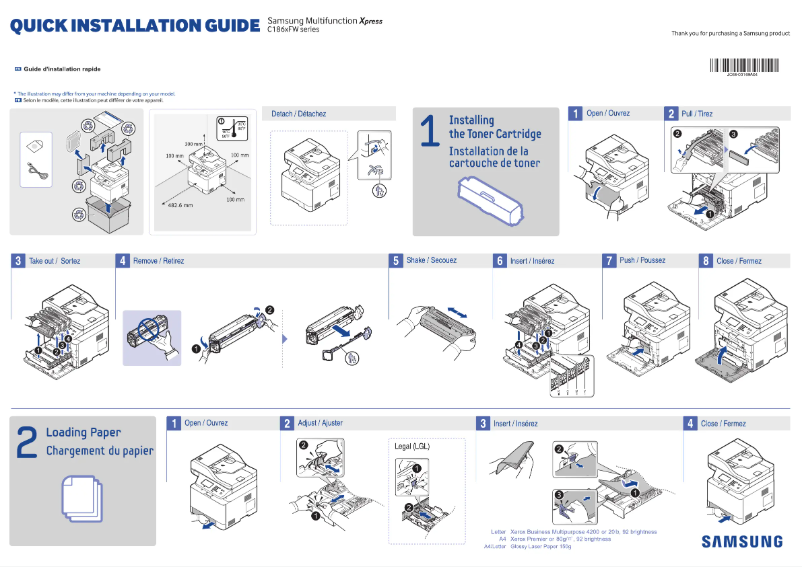
This printer measures 420 mm in width, 426 mm in depth, and 448 mm in height, with a weight of 21.44 kg, which may make its installation and movement a bit more complex in tight spaces.
Packaging Information
The package dimensions of the Samsung Xpress SL-C1860FW are 549 mm in width, 559 mm in depth, and 597 mm in height, ensuring secure transport.
Conclusion
The Samsung Xpress SL-C1860FW is a multifunction printer that combines performance and advanced features, ideal for professional users seeking a comprehensive and efficient printing solution.


