

Manuals of product 55OLED809
Editorial note
The Philips 55OLED809 is a television that stands out for its exceptional picture quality, thanks to OLED technology that offers deep blacks and vibrant colors. The performance is remarkable, ensuring a smooth and enjoyable user experience when streaming content. Its modern and elegant design allows for harmonious integration into any type of interior, adding an aesthetic touch to your living space. Additionally, the product comes with useful documents, such as a user manual and a quick start guide, making installation and setup easier. However, the price of this model may be a barrier for some consumers, especially compared to other televisions of similar size. While OLED technology is impressive, it can be prone to screen burn-in if static images are displayed for too long. Furthermore, users have reported connectivity issues with certain third-party applications, which can detract from the streaming experience. Finally, the remote control is considered bulky and not intuitive by some, complicating navigation through the menus. The weight of the television can also pose challenges during installation, potentially requiring additional assistance. Despite these drawbacks, the sturdiness of the product reflects its solid construction.Score details
User experience
The user experience is enhanced by the optimal performance of the Philips 55OLED809, but connectivity issues with third-party applications can hinder smooth usage.
Performance
The performance is excellent, with exceptional image quality thanks to OLED technology, offering deep blacks and vibrant colors.
Design
The design is modern and sleek, seamlessly integrating into any type of interior, adding an aesthetic touch to the room.
Value for money
The price may be high compared to other models of similar size, which could deter some consumers, although the quality partly justifies this investment.
Usability
Although the television is generally easy to use, the remote control is considered bulky and not intuitive by some users, which can complicate navigation.
Support
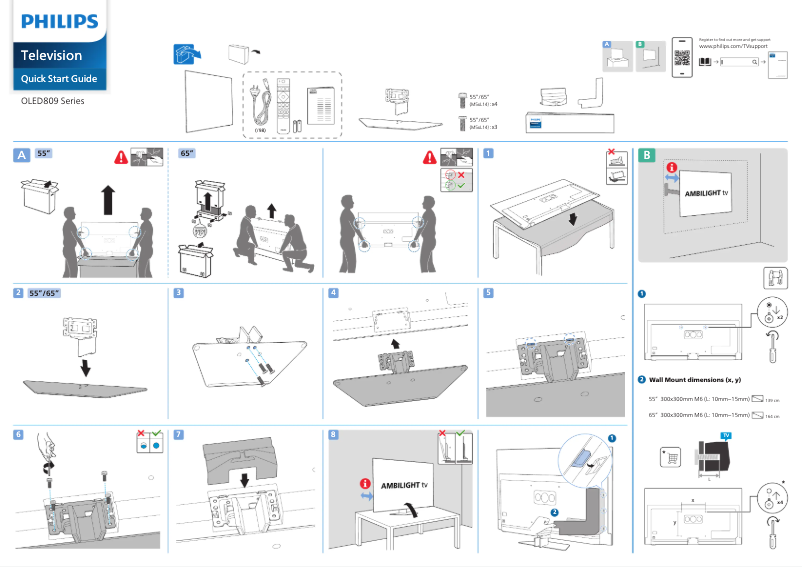
Accompanying documents, such as a user manual and a quick start guide, are available, making installation and product familiarization easier.
Robustness
The weight of the television can pose challenges during installation or relocation, potentially requiring additional help, but it also reflects its solid construction.
Advantages
OLED image quality with deep blacks
Smooth performance for optimal streaming
Modern design that fits into any interior
Manuals and guides for easy installation
Philips: a reliable and innovative brand
Disadvantages
High price compared to the competition
Risk of OLED screen burn-in
Connectivity issues with certain applications
Bulky and unintuitive remote control
Heavy weight during installation
Technical Specifications 55OLED809
General Information
-
Model55OLED809
-
Brand
-
Category
-
Type
-
SKU1947234
-
MPN1947234
Frequently Asked Questions
What is the recommended viewing distance for my Philips TV?
What should I do if my television is no longer receiving a signal?
What are the dimensions of the screen on my television?
What does the acronym HDMI stand for?
Is it possible to connect devices from different brands via Bluetooth?
How do I enable universal access for blind or visually impaired people on my Philips 55OLED809 TV?
How do I adjust the mixed volume for audio description on digital channels of my Philips 55OLED809?
Is the user manual for the Philips 55OLED809 available in French?
Similar products


More product categories from brand Philips
Audio Philips
Home appliances Philips
Personal care Philips
Household appliances Philips
Interior Philips
Phones Philips
Other Philips
Garden and outdoor Philips
Software Philips
More product types from brand Philips


Presentation of product 55OLED809 specifications from brand Philips
General Information
The Philips 55OLED809 television embodies the excellence of the Philips brand, known for its innovation and commitment to quality in the electronics sector. This model, featuring a 55-inch diagonal, ensures remarkable performance, providing an immersive visual experience thanks to its advanced technologies.
Advantages
The OLED technology present in the Philips 55OLED809 guarantees exceptional image quality, with deep blacks and vibrant colors that enhance every scene. This television offers optimal fluidity when streaming content, making movies and shows captivating. Its modern and elegant design allows it to fit perfectly into any type of interior, adding a contemporary touch to your space.
To facilitate its handling, the product comes with documents such as a user manual and a quick start guide. The reputation of the Philips brand also ensures a certain level of trust in terms of reliability and innovation.
Disadvantages
However, the Philips 55OLED809 has some drawbacks to consider. Its price may be higher compared to other televisions of similar size, which could deter some potential buyers. Additionally, although OLED technology offers high-quality images, it can be prone to screen burn-in issues if static images are displayed for too long.
Some users have also reported connectivity difficulties with third-party applications, which can affect the streaming experience. The remote control, considered by some to be bulky and not intuitive, may make navigation through the menus less enjoyable. Finally, the weight of the television could pose challenges during installation or relocation, potentially requiring additional assistance.


