

Manuals of product TX-58DX700E

Editorial note
The Panasonic TX-58DX700E stands out for its exceptional picture quality thanks to its 4K Ultra HD resolution, offering an immersive visual experience that makes every movie and program captivating. The Local Dimming backlight technology also enhances contrast and picture quality by adjusting the brightness of specific areas of the screen, which is an undeniable asset for cinema enthusiasts. Its modern and sleek design, combined with the possibility of VESA mounting, allows for seamless integration into various spaces, thus optimizing space usage. Additionally, the built-in speakers provide a satisfying audio experience, eliminating the need for external speakers. However, the Panasonic TX-58DX700E has some limitations. The lack of Smart TV features restricts access to streaming apps and online services, which may disappoint those looking for more versatile use. Furthermore, it does not support 3D technology, which could be a drawback for users wanting an immersive experience in that format. Weighing 23 kg makes the television relatively difficult to handle and install, especially for wall mounting. Finally, although the picture and sound quality are good, the annual energy consumption of 152 kWh may be considered high, thus impacting electricity bills. The lack of USB 3.0 ports also limits the data transfer speed for modern devices. In conclusion, the Panasonic TX-58DX700E is a good choice for those who prioritize picture and sound quality, but its limitations in terms of connectivity and energy efficiency may reduce its appeal compared to other models on the market.Score details
User experience
The user experience is good thanks to the exceptional 4K Ultra HD image quality, but the lack of Smart TV features limits its use.
Performance
The performance is optimal for viewing content, especially due to the Local Dimming backlight technology that enhances contrast.
Design
The modern and sleek design with VESA mounting allows for seamless integration into various spaces.
Value for money
Although the product offers good image and sound quality, the high energy consumption and lack of USB 3.0 ports may reduce the perception of its value.
Features
The television does not support 3D technology and is not a Smart TV, which limits its appeal compared to other competing models.
Advantages
Immersive 4K Ultra HD image quality
Enhanced contrast with Local Dimming
Tuner compatible with various formats
Quality sound with built-in speakers
Modern design and easy integration
Disadvantages
No Smart TV, limited access to apps.
Lack of 3D compatibility.
Weight of 23 kg, difficult to handle.
High energy consumption, impact on bills.
No USB 3.0 ports.
Technical Specifications TX-58DX700E
General Information
-
ModelTX-58DX700E
-
Brand
-
Category
-
Type
-
SKU864418
-
MPN864418
Screen
-
Screen size58 "
-
Type HD4K Ultra HD
-
Screen resolution3840 x 2160 pixels
-
Screen brightness- cd/m²
-
Response time- ms
-
Screen shapeFlat
-
Display technologyLED
-
Image format16:9
-
Image format16:9
-
Supported graphic resolutions3840 x 2160
-
Interpolation movement technologyBMR IFC
-
Motion interpolation frequency1400 Hz
-
Screen diagonal (cm)146 cm
-
Screen size58 "
-
Type HD4K Ultra HD
-
Screen resolution3840 x 2160 pixels
-
Screen brightness- cd/m²
-
Response time- ms
-
Screen shapeFlat
-
Display technologyLED
-
Image format16:9
-
Supported graphic resolutions3840 x 2160
-
Interpolation movement technologyBMR IFC 1400 Hz
-
Screen diagonal (cm)146 cm
TV Tuner
-
Analog signal format system-
-
Analog signal format system-
-
Digital signal system formatDVB-C, DVB-T, DVB-T2
-
Tuner typeAnalog and digital
-
Digital signal system formatDVB-C, DVB-T, DVB-T2
-
Tuner typeAnalog and digital
Smart TV / smart TV
-
Internet TV-
-
HbbTV (Hybrid Broadcast Broadband TV)Yes
-
Installed operating systemFirefox OS
-
HbbTV (Hybrid Broadcast Broadband TV)Yes
Other features
-
Certified DLNA (Digital Living New-York Alliance)Yes
-
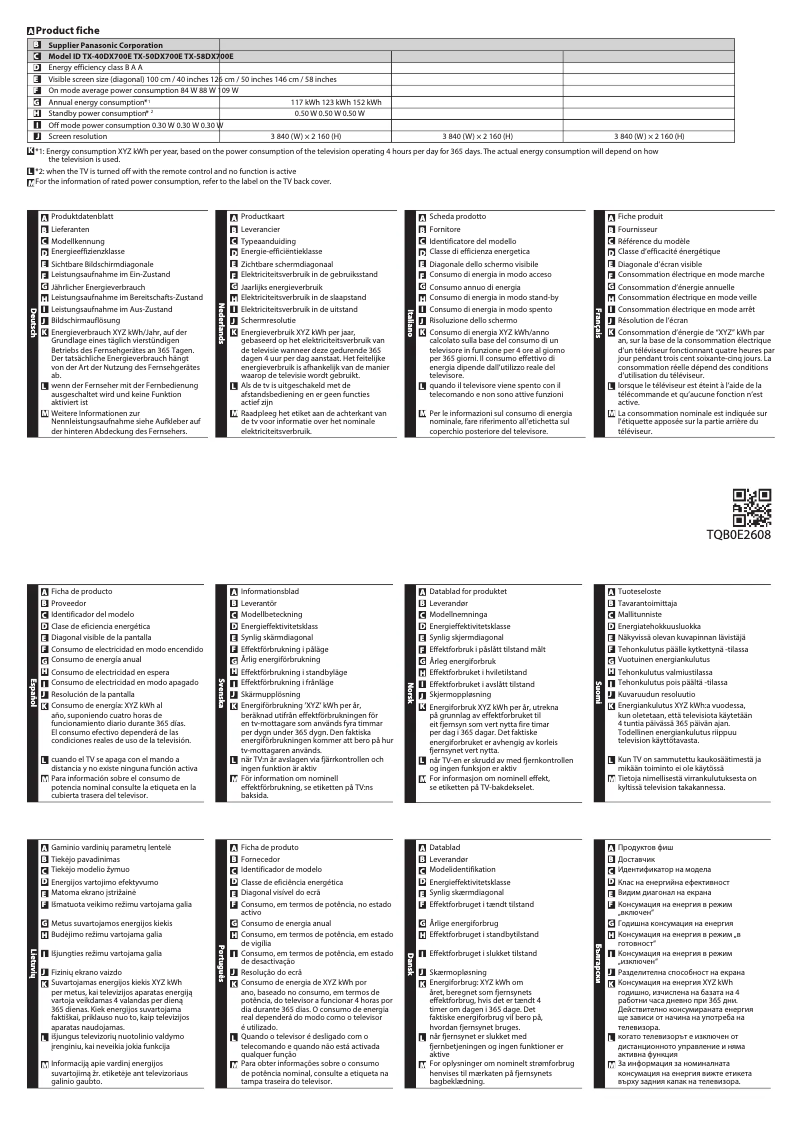
Annual energy consumption152 kWh
-
Energy efficiency class (old)A
-
3D CompatibilityNo
-
Certified DLNA (Digital Living New-York Alliance)Yes
-
Certified DLNA (Digital Living New-York Alliance)Yes
-
Certified DLNA (Digital Living New-York Alliance)Yes
-
Annual energy consumption152 kWh
-
Energy efficiency class (old)A
-
3D CompatibilityNo
-
Certified DLNA (Digital Living New-York Alliance)Yes
Audio
-
Number of speakers2
-
Rated power of RMS20 W
-
Sound modesCustom, Environment, Music, Standard
-
Number of speakers2
-
Rated power of RMS20 W
-
Sound modesCustom, Environment, Music, Standard
Connectivity
-
Integrated PC connector (D-Sub)-
-
DVI Port-
-
Quantity of DVI-D ports-
-
Common Interface (CI)-
-
S-Video Input-
-
Integrated PC connector (D-Sub)-
-
DVI Port-
-
Quantity of DVI-D ports-
-
Common Interface (CI)-
-
S-Video Input-
-
Quantity of HDMI ports3
-
Quantity of USB 2.0 Ports2
-
Digital Audio Output (Optical)1
-
Digital Audio Output (Optical)1
-
Digital Audio Output (Optical)1
-
Common Interface Plus (Cl+)Yes
-
Common Interface Plus (CI+) Version1.3
-
Digital Audio Output (Optical)1
-
Common Interface Plus (Cl+)Yes
-
Quantity of HDMI ports3
-
Quantity of USB 2.0 Ports2
-
Digital Audio Output (Optical)1
-
Digital Audio Output (Optical)1
-
Common Interface Plus (Cl+)Yes
-
Common Interface Plus (CI+) Version1.3
-
Digital Audio Output (Optical)1
Network
-
Web BrowserYes
-
Web BrowserYes
-
Supported browsersFirefox
-
Web BrowserYes
-
Web BrowserYes
-
Web BrowserYes
-
Supported browsersFirefox
-
Web BrowserYes
Representation / realization
-
Internet TV-
-
Supported video format3GPP
-
TeletextAVI
-
Voice commandH.265
-
Backlight dimming technologyM4V
-
Number of processor coresMKV
-
Supported audio formatsMP4
-
Supported image formatsPS
-
Voice commandTS
-
Voice commandVOB
-
Supported video formatVRO
-
TeletextWMV
-
Voice command1000 pages
-
Installed operating systemYes
-
Backlight dimming technologyLocal Dimming
-
Voice command4
-
Voice commandAAC
-
Supported audio formatsFLAC
-
Voice commandMP3
-
Voice commandMP4
-
Voice commandWAV
-
WMA
-
JPG
-
Yes
-
Yes
-
3GPP
-
AVI
-
H.265
-
M4V
-
MKV
-
MP4
-
PS
-
TS
-
VOB
-
VRO
-
WMV
-
1000 pages
-
Yes
-
Firefox OS
-
Local Dimming
-
Yes
-
Yes
-
AAC
-
FLAC
-
MP3
-
MP4
-
WAV
-
WMA
-
Yes
-
Yes
-
Yes
Design
-
Product colorGray
-
Built-in power buttonYes
-
Built-in power buttonYes
-
VESA standard400 x 200 mm
-
Product colorGray
-
Built-in power buttonYes
-
Built-in power buttonYes
-
VESA standard400 x 200 mm
Power
-
Energy consumption (standby mode)0.5 W
-
Typical electricity consumption109 W
-
AC input frequency50 - 60 Hz
-
AC input voltage220 - 240 V
-
Electricity consumption (stop)0.3 W
-
Consumption (max)159 W
-
Energy consumption (standby mode)0.5 W
-
Typical electricity consumption109 W
-
AC input frequency50 - 60 Hz
-
AC input voltage220 - 240 V
-
Consumption (max)159 W
Weight and dimensions
-
Weight (without support)23000 g
-
Width (without support)1290 mm
-
Width (without support)1290 mm
-
Depth (without support)41 mm
-
Height (without support)753 mm
-
Depth (support included)239 mm
-
Height (support included)805 mm
-
Weight (with support)24000 g
-
Weight (without support)23000 g
-
Width (without support)1290 mm
-
Width (without support)1290 mm
-
Depth (without support)41 mm
-
Height (without support)753 mm
-
Depth (support included)239 mm
-
Height (support included)805 mm
-
Weight (with support)24000 g
Packaging information
-
Package weight31000 g
-
Package width1491 mm
-
Package depth189 mm
-
Package height857 mm
-
Package weight31000 g
-
Package width1491 mm
-
Package depth189 mm
-
Package height857 mm
Management features
-
Number of OSD languages27
-
Voice commandYes
-
Voice commandYes
-
Voice commandYes
-
Voice commandYes
Hospitality functions
-
My Home ScreenYes
Frequently Asked Questions
What is the recommended viewing distance for my Panasonic TV?
What should I do if my TV is not receiving a signal?
What are the dimensions of the screen on my TV?
What does the acronym HDMI stand for?
Is it possible to connect Bluetooth devices from different brands?
What is the screen size of the Panasonic TX-58DX700E?
What is the resolution of the screen on the Panasonic TX-58DX700E?
Does the Panasonic TX-58DX700E have a 4K Ultra HD screen?
How many HDMI ports are available on the Panasonic TX-58DX700E?
Is the Panasonic TX-58DX700E a Smart TV?
How many built-in speakers does the Panasonic TX-58DX700E have?
Does the Panasonic TX-58DX700E support Wi-Fi?
How do I change the channel on the Panasonic TX-58DX700E TV?
Why is the image on my Panasonic TX-58DX700E TV not sharp?
How do I adjust the volume on the Panasonic TX-58DX700E TV?
How do I access the [eHELP] function on the Panasonic TX-58DX700E TV?
How do I change the channel on the Panasonic TX-58DX700E TV?
Why is the image on my Panasonic TX-58DX700E TV not clear?
How do I adjust the volume on the Panasonic TX-58DX700E TV?
Why is my Panasonic TX-58DX700E TV not producing sound?
How do I access the [eHELP] function on the Panasonic TX-58DX700E TV?
Is the manual for the Panasonic TX-58DX700E available in French?
Que faire si ma télévision ne s'allume pas ?
Que faire si la télécommande ne fonctionne pas ?
Comment accéder à la fonction [eHELP] sur le téléviseur Panasonic TX-58DX700E ?
Le manuel du Panasonic TX-58DX700E est-il disponible en français ?
Similar products


More product categories from brand Panasonic
Home appliances Panasonic
Phones Panasonic
Audio Panasonic
Camera and photography Panasonic
Personal care Panasonic
Other Panasonic
Tools Panasonic
Interior Panasonic
More product types from brand Panasonic








Presentation of product TX-58DX700E specifications from brand Panasonic
General Information
The Panasonic TX-58DX700E is a television from the Panasonic brand, known for its innovation and quality in the field of household appliances. This model, identified by the EAN code 5025232839506, promises optimal performance and an enriching user experience.
Screen
With a screen size of 58 inches (146 cm), the Panasonic TX-58DX700E offers an immersive visual experience. It features a 4K Ultra HD resolution (3840 x 2160 pixels) that guarantees exceptional image quality. Its LED display technology and 16:9 aspect ratio ensure impressive visual clarity. The motion interpolation frequency of 1400 Hz and the Local Dimming backlight dimming function enhance contrast and image fluidity, making each scene more captivating.
TV Tuner
The Panasonic TX-58DX700E is equipped with an analog and digital tuner (DVB-C, DVB-T, DVB-T2), allowing for wide compatibility with various broadcast formats. This enhances viewing options and ensures quality reception.
Smart TV
This model is not a Smart TV, meaning it does not allow access to online streaming applications or services. However, it is equipped with the Firefox OS operating system that facilitates usage. It also offers the HbbTV feature for access to interactive content.
Audio
The Panasonic TX-58DX700E integrates powerful speakers, providing a 20 W RMS output for an immersive audio experience. Several sound modes (Custom, Environment, Music, Standard) allow for sound adaptation based on the content being played.
Connectivity
This television has 3 HDMI ports and 2 USB 2.0 ports, making it easy to connect to various multimedia devices. It also includes an Ethernet port for a stable and fast network connection, as well as a digital optical audio output for high-quality sound transmission.
Design and Dimensions
The Panasonic TX-58DX700E features a modern design with a gray finish, harmoniously fitting into any environment. Its dimensions are 1290 mm in width, 753 mm in height, and 239 mm in depth (without stand), making it suitable for wall mounting thanks to its VESA 400 x 200 mm mounting standard.
Energy Consumption
The annual energy consumption is 152 kWh, while the standby consumption is 0.5 W. This model is rated class A for energy efficiency, helping to reduce the impact on electricity bills.
Weight
The weight of the Panasonic TX-58DX700E is 23 kg, which may make wall installation a bit more complex. It is important to consider this weight when planning transport and installation.
Packaging Information
The package of the Panasonic TX-58DX700E weighs approximately 31 kg and its dimensions are 1491 mm in width, 189 mm in depth, and 857 mm in height. These specifications ensure adequate protection during transport.
Management Features
This television offers 27 languages for on-screen display, making its use accessible to a wide audience. Additionally, it comes with an electronic program guide and on-screen display for intuitive navigation through settings.
Hospitality Features
The Panasonic TX-58DX700E includes a my home screen feature, allowing for customization of the user interface.


