

Manuals of product TX-55CX700E


Editorial note
The Panasonic TX-55CX700E stands out for its exceptional image quality thanks to its 4K Ultra HD resolution (3840 x 2160 pixels) and LED backlighting technology, providing an immersive visual experience. Its wide viewing angle of 176° is ideal for family or friends movie nights. Additionally, the varied connectivity with three HDMI ports and two USB 2.0 ports makes it easy to connect with various multimedia devices, making its use versatile. However, this model has some limitations. The lack of Smart TV features and 3D compatibility may disappoint users looking for a more modern and immersive experience. Furthermore, the lack of information on response time and screen brightness raises questions about the fluidity of images in different lighting environments. The audio power of 20 W may also prove insufficient for larger spaces, and its weight of 21 kg complicates installation for a single person. In summary, the Panasonic TX-55CX700E is a television offering excellent image quality and good connectivity, but it could benefit from improvements in smart features and audio power to fully meet user expectations.Score details
User experience
The user experience is generally positive due to the exceptional image quality and varied connectivity, although the lack of Smart TV features limits access to applications.
Performance
The performance is satisfactory with a 4K Ultra HD resolution, but the unspecified response time and screen brightness may raise questions about image fluidity.
Battery life
The power consumption in standby mode is very low (0.5 W), thus contributing to energy savings and reducing environmental impact.
Design
The design is modern with a silver color that gives it an elegant look, although its weight of 21 kg may complicate installation.
audio
The built-in speakers and Dolby Digital decoders provide decent sound quality, but the power of 20 W may be insufficient for larger spaces.
Features
The television has several HDMI and USB ports, but the lack of 3D compatibility and Smart TV features limits its capabilities.
Advantages
4K Ultra HD image quality
Wide viewing angle of 176°
Built-in Dolby Digital sound
Connectivity with 3 HDMI and 2 USB
Standby mode at 0.5 W
Easy access to Netflix
Disadvantages
No Smart TV features
No 3D compatibility
Unspecified response time
Limited audio power of 20 W
Weight of 21 kg difficult to handle
Technical Specifications TX-55CX700E
General Information
-
ModelTX-55CX700E
-
Brand
-
Category
-
Type
-
SKU864442
-
MPN864442
Screen
-
LED backlighting-
-
Screen size55 "
-
Type HD
-
Screen resolution4K Ultra HD
-
Supported graphic resolutions
-
Supported video modes3840 x 2160 pixels
-
Screen brightness
-
Response time3840 x 2160
-
Vertical viewing angle
-
Vertical viewing angle2160p
-
Interpolation movement technology
-
Screen diagonal (cm)- cd/m²
-
Screen shape
-
Image format- ms
-
-
176 °
-
-
176 °
-
-
IFC (Intelligent Frame Creation) 800 Hz
-
-
139 cm
-
-
Flat
-
-
16:9
Other features
-
Certified DLNA (Digital Living New-York Alliance)Yes
-
3D compatibility typeActive
-
Certified DLNA (Digital Living New-York Alliance)Yes
-
Certified DLNA (Digital Living New-York Alliance)Yes
-
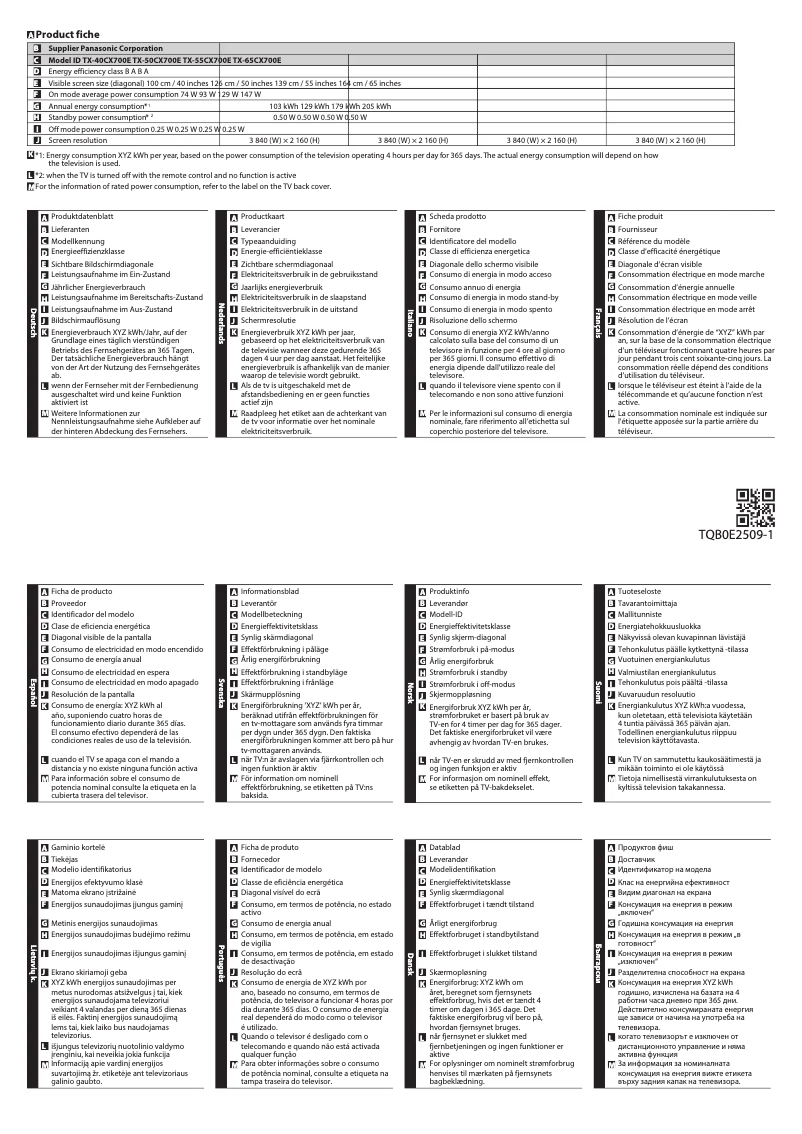
Energy consumption (average)129 W
-
Annual energy consumption179 kWh
-
Energy efficiency class (old)B
-
Certified DLNA (Digital Living New-York Alliance)Yes
TV Tuner
-
Analog signal format system-
-
Tuner typeAnalog and digital
-
Digital signal system formatDVB-C, DVB-T, DVB-T2
Smart TV / smart TV
-
Smart TV-
-
Internet TVYes
-
Video appsNetflix
Audio
-
Number of speakers2
-
Rated power of RMS20 W
-
Sound modesMusic, Standard
-
Integrated audio decodersDolby Digital, Dolby Digital Plus
Connectivity
-
Common Interface (CI)-
-
Quantity of HDMI ports3
-
DVI PortNo
-
Built-in memory card readerYes
-
DVI PortNo
-
S-Video Input0
-
Quantity of USB 2.0 Ports2
-
Headset output1
-
Headset output1
-
Headset output1
-
Headset output1
-
Headset output1
-
Headset output1
-
Built-in memory card readerYes
-
S-Video Input0
-
Consumer Electronics Control (CEC)VIERA Link
-
Headset output1
-
Built-in memory card readerYes
-
Compatible memory cardsSD
Network
-
NavigationYes
-
NavigationYes
-
NavigationYes
-
NavigationYes
Management features
-
Voice commandYes
-
Voice commandYes
-
Number of OSD languages26
-
Voice commandYes
Representation / realization
-
Backlight dimming technologyLocal Dimming
-
Teletext1500 pages
-
Game ModeYes
-
Supported video format3GPP, AVCHD, AVI, FLV, M4V, MKV, MP4, TS, VOB, VRO, WMV
-
Supported audio formatsAAC, FLAC, MP3, WAV, WMA
-
Supported image formatsJPG, MPO
-
Game ModeYes
-
Game ModeYes
Design
-
VESA mount-
-
Product colorSilver
-
Built-in power buttonYes
Power
-
Energy consumption (standby mode)0.5 W
-
AC input voltage220 - 240 V
-
AC input frequency50 - 60 Hz
Weight and dimensions
-
Device width (support included)1237 mm
-
Depth (without support)54 mm
-
Height (without support)717 mm
-
Weight (without support)20000 g
-
Device width (support included)1237 mm
-
Depth (support included)242 mm
-
Height (support included)762 mm
-
Weight (with support)21000 g
Packaging information
-
Package width1615 mm
-
Package depth151 mm
-
Package height837 mm
-
Package weight27000 g
Packaging contents
-
Remote control providedYes
Frequently Asked Questions
What is the recommended viewing distance for my Panasonic TV?
What should I do if my TV is no longer receiving a signal?
What are the dimensions of my TV screen?
What does the acronym HDMI stand for?
Is it possible to connect devices from different brands via Bluetooth?
What is the screen size of the Panasonic TX-55CX700E?
What is the resolution of the screen on the Panasonic TX-55CX700E?
Does the Panasonic TX-55CX700E have a 55-inch screen?
Is the Panasonic TX-55CX700E a 3D TV?
What type of HD does the Panasonic TX-55CX700E have?
Does the Panasonic TX-55CX700E support 2160p video mode?
Can the Panasonic TX-55CX700E access Netflix and other video apps?
How can I resolve the issue of white spots or ghosting on my Panasonic TX-55CX700E TV?
What should I do if some channels are not available on my Panasonic TX-55CX700E TV?
What steps should I follow to troubleshoot issues with analog TV on my Panasonic TX-55CX700E TV?
What should I do if the signal reception on my Panasonic TX-55CX700E TV is affected by the weather?
What should I do if my troubleshooting attempts fail on my Panasonic TX-55CX700E TV?
How do I activate 3D mode on the Panasonic TX-55CX700E TV?
Why is 3D content not displaying correctly on my Panasonic TX-55CX700E TV?
How do I connect a 3D-compatible Blu-ray player to the Panasonic TX-55CX700E TV?
Why is the external input not working on my Panasonic TX-55CX700E TV?
How do I turn off the 3D glasses after use on the Panasonic TX-55CX700E TV?
Is the manual for the Panasonic TX-55CX700E available in French?
Similar products


More product categories from brand Panasonic
Home appliances Panasonic
Phones Panasonic
Audio Panasonic
Camera and photography Panasonic
Personal care Panasonic
Other Panasonic
Tools Panasonic
Interior Panasonic
More product types from brand Panasonic








Presentation of product TX-55CX700E specifications from brand Panasonic
General Information
The Panasonic TX-55CX700E is a television from the renowned brand Panasonic, famous for its commitment to quality and technological innovation. This model, identified by the EAN code 5025232811991, is designed to deliver high-level performance and an enriching user experience.
Screen
With a screen size of 55 inches, the Panasonic TX-55CX700E immerses you in your content. It displays a 4K Ultra HD resolution (3840 x 2160 pixels), ensuring exceptional image clarity and precision. The LED backlighting technology enhances this visual quality, while the wide viewing angle of 176° allows for an immersive experience from different angles. This model also supports 2160p video mode, providing smooth display thanks to the 800 Hz IFC (Intelligent Frame Creation) technology.
Other Features
The Panasonic TX-55CX700E does not support 3D technology, but it is equipped with built-in speakers for quality sound experience. Additionally, it offers teletext functionality, enriching user interaction. Its power consumption is 129 W in normal operation and 0.5 W in standby mode, making it an energy-efficient device. It is also DLNA certified, ensuring compatibility with other multimedia devices.
TV Tuner
This television is equipped with an analog and digital tuner, capable of receiving various signals, allowing you to enjoy a wide range of channels. It supports DVB-C, DVB-T, and DVB-T2 digital signal formats, ensuring good image and sound quality.
Smart TV
The Panasonic TX-55CX700E does not have Smart TV features, which limits direct access to online applications. However, it is compatible with streaming applications such as Netflix, allowing you to access a vast library of audiovisual content.
Audio
This model is equipped with two speakers offering a power of 20 W, suitable for use in medium-sized spaces. The available sound modes, such as Music and Standard, allow you to adjust the audio experience according to your preferences. Additionally, it integrates Dolby Digital and Dolby Digital Plus audio decoders for a richer sound immersion.
Connectivity
The Panasonic TX-55CX700E offers three HDMI ports and two USB 2.0 ports, facilitating connection with various external devices. Although it does not have a D-Sub connector or DVI ports, it is compatible with the Common Interface Plus (Cl+) for improved management of connected devices. An optical digital audio output is also present for high-fidelity connection with external audio systems.
Network
This television is equipped with an Ethernet/LAN connection as well as Wi-Fi, allowing for a stable and fast network connection. Additionally, the Bluetooth functionality facilitates interaction with other compatible wireless devices.
Management Features
The Panasonic TX-55CX700E includes an electronic program guide and an on-screen display (OSD) for easy navigation through settings. It also offers multilingual support with 26 available languages, making the device accessible to a wide audience.
Representation / Realization
The Local Dimming backlight technology enhances contrast and image quality. It is capable of playing multiple video and audio formats, ensuring extensive compatibility. An ambient light sensor automatically adjusts the lighting according to surrounding conditions, and a Game mode is included to optimize performance during gaming sessions.
Design
The silver design of the Panasonic TX-55CX700E gives it a modern and elegant look. It is also equipped with a built-in power button for simplified control.
Power
This television operates with an AC input voltage of 220 to 240 V and a frequency of 50 to 60 Hz, ensuring compatibility with standard electrical systems.
Weight and Dimensions
The Panasonic TX-55CX700E measures 1237 mm wide, 717 mm high, and 54 mm deep without the stand, while its weight is 20 kg. With the stand, its dimensions are 1237 mm in width, 762 mm in height, and 242 mm in depth, weighing 21 kg.
Packaging Information
The package of the Panasonic TX-55CX700E measures 1615 mm wide, 151 mm deep, and 837 mm high, with a total weight of 27 kg, ensuring adequate protection during transport.
Contents of the Package
The product comes with a remote control for easy operation of its features.


