

Manuals of product Workstation WS75

Editorial note
The MSI Workstation WS75 stands out for its optimal performance, ideal for professionals using demanding applications. Its reputation for quality and innovation, characteristic of the MSI brand, ensures a high-level user experience. The screen offers excellent resolution and vibrant colors, making it a perfect choice for creative tasks and visual analysis. Additionally, its lightweight and slim design makes it easy to transport, although its weight may appear as a drawback for some frequent users. However, it is important to note that battery life can be limited during intensive use, leading to frequent recharges. The price of the WS75 may also be considered high compared to other laptops on the market, which could deter buyers looking for more economical options. The cooling system, while efficient, can be noisy under heavy load, which may disturb the user in quiet environments. Finally, the quality of the built-in speakers leaves something to be desired, often requiring the use of external devices for a better multimedia experience. In summary, the MSI Workstation WS75 is a powerful and attractive laptop for professionals, but users should be aware of its limitations in terms of portability, battery life, and value for money.Score details
User experience
The MSI Workstation WS75 offers a high-level user experience thanks to its reputation for quality and innovation. The available documents make it easy to get started.
Performance
The performance is optimal, ideal for professionals using demanding applications. The model guarantees significant computing power.
Battery life
The battery life can be limited during intensive use, requiring frequent recharges, which can be a drawback for users on the go.
Design
The lightweight and slim design of the WS75 makes it easily portable, although it is relatively heavy for a laptop.
Value for money
The price can be high compared to other laptops, which could deter some buyers looking for more economical options.
Usability
Documents such as the user manual and technical sheet facilitate usage, although the quality of the built-in speakers may disappoint.
Robustness
Although the product is robust, the cooling system can be noisy under heavy load, which can affect the experience in quiet environments.
Advantages
Powerful performance for demanding applications
MSI's reputation for quality and innovation
Lightweight and easily portable design
User documentation and technical sheet included
High-resolution screen and vibrant colors
Disadvantages
Heavy weight, difficult to transport.
Limited battery life under intensive use.
High price compared to other models.
Cooling noise under heavy load.
Poor quality built-in speakers.
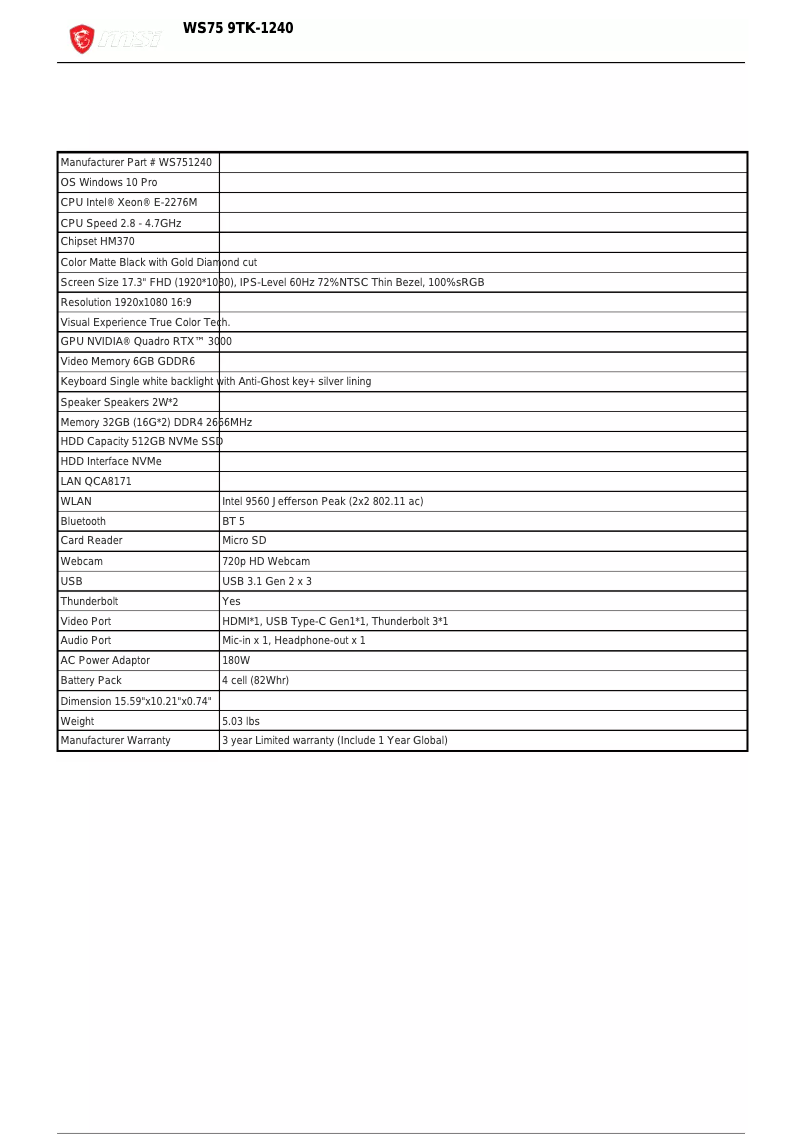
Technical Specifications Workstation WS75
General Information
-
ModelWORKSTATION WS75
-
Brand
-
Category
-
Type
-
SKU1317081
-
MPN1317081
Frequently Asked Questions
What are the factors influencing download speed on the Internet?
What are the sizes of my laptop screen?
What is HDMI?
What is the best method to clean my laptop?
How should I proceed to clean my keyboard?
What is Bluetooth?
Is the MSI Workstation WS75 manual available in French?
Similar products


More product categories from brand MSI
More product types from brand MSI





Presentation of product Workstation WS75 specifications from brand MSI
General Information
The MSI Workstation WS75 is a laptop designed by the renowned brand MSI, known for its commitment to innovation and quality in the technology field. This model, the Workstation WS75, is specifically crafted to meet the needs of professionals requiring powerful computing capabilities, thus providing an enhanced and optimized user experience.
Advantages
The MSI Workstation WS75 stands out with several advantageous features:
- Optimal performance: This laptop is equipped with high-end components, perfect for resource-intensive applications.
- Innovation and quality: As a product of the MSI brand, it reflects a well-established reputation, ensuring a superior user experience.
- Portability: Its slim and lightweight design makes it easy to transport, ideal for professionals on the go.
- Available documents: Accompanied by a user manual and a technical sheet, it allows for quick and effective handling.
- High-quality display: The WS75's screen offers excellent resolution and vibrant colors, ideal for creative tasks and visual analysis.
Disadvantages
Despite its many strengths, the MSI Workstation WS75 also has some drawbacks:
- Relatively high weight: This may make it less convenient to carry, especially for users who travel frequently.
- Limited battery life: During intensive use, it may require frequent recharges.
- Price: Its cost may be higher than that of other laptops, which can be a barrier for some buyers looking for more affordable options.
- Noisy cooling system: Under heavy load, the fan noise can be disruptive in quiet environments.
- Quality of built-in speakers: The speakers may not meet expectations, impacting the multimedia experience without external devices.


