
Manual of product LeapStart 3D
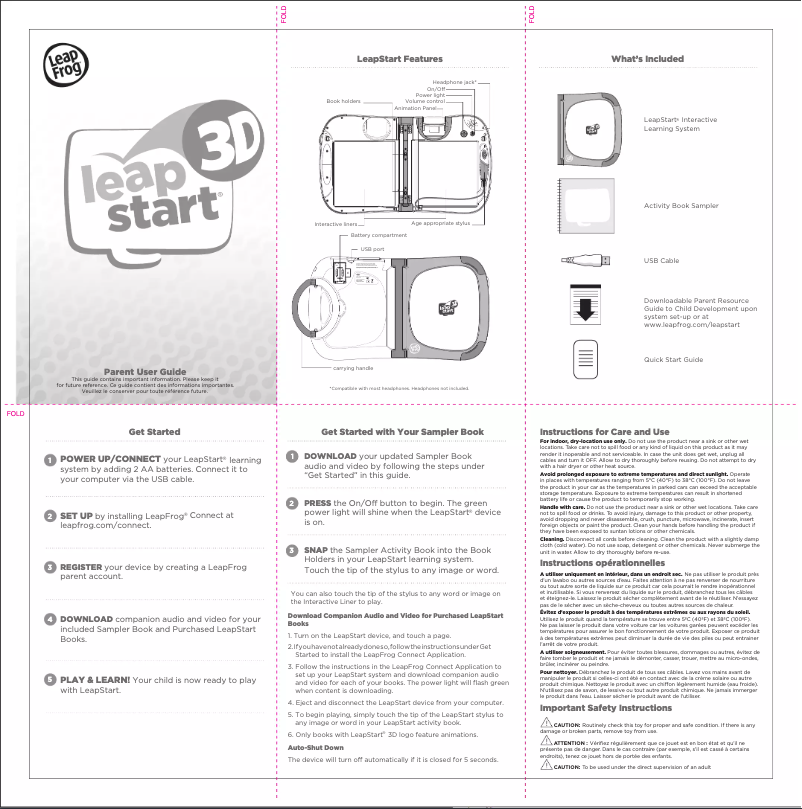
Editorial note
The Leap Frog LeapStart 3D is an educational tablet designed for young children, offering an intuitive interface that promotes independent learning. Thanks to its interactive feedback system, users receive encouragement and real-time advice, making the learning experience both fun and engaging. Additionally, Leap Frog's build quality ensures durability, which is essential for use by children. However, there are some drawbacks to consider. The limited educational content may make the experience repetitive in the long run, especially with only a small number of books and activities available. Furthermore, the screen size is relatively small, which can complicate reading and interaction for some children. The price is also considered high compared to other options on the market, offering similar or even superior features. In terms of user experience, the score of 78 indicates general satisfaction, although the interface may seem complex for some. Performance, rated at 70, is adequate, but the content limitation could frustrate users over time. The design receives a satisfactory score of 75, although the screen could be improved. As for the value for money, the score of 65 highlights a perception of high cost compared to alternatives. On the other hand, support is well-rated at 85, thanks to a clear user manual that makes it easier for parents to get started. In summary, the Leap Frog LeapStart 3D is an interesting learning tool, but it is important to consider its limitations before purchase.Score details
User experience
The user experience is generally positive due to an intuitive interface, but some children may find the interface complex.
Performance
The performance is adequate for educational activities, but the limited content can make learning repetitive in the long term.
Design
The design is suitable for young children with good build quality, but the screen size is relatively small.
Value for money
The price is considered high compared to other options on the market that offer similar or better features.
Support
The user manual is clear and makes it easy to get started, which is an advantage for parents accompanying their children.
Advantages
Intuitive interface for self-directed learning
Interactive and engaging feedback
Varied and enriching educational content
Durable and shock-resistant
Quick setup for parents
Disadvantages
Limited and repetitive educational content
Screen too small for comfort
High price compared to alternatives
Complex user interface for some children
Dependence on specific books only
Technical Specifications LeapStart 3D
General Information
-
ModelLEAPSTART 3D
-
Brand
-
Category
-
Type
-
SKU1472704
-
MPN1472704
Frequently Asked Questions
What factors influence download speed on the Internet?
What are the dimensions of my tablet's screen?
Is the user manual for the Leap Frog LeapStart 3D available in French?
Similar products


More product categories from brand Leap Frog


Presentation of product LeapStart 3D specifications from brand Leap Frog
General Information
The Leap Frog LeapStart 3D tablet is a product of the Leap Frog brand, known for its commitment to quality and innovation in the educational device sector. This model, designed specifically for young children, stands out for its optimal performance and user-friendly interface, promoting independent learning while stimulating users' curiosity.
Advantages
The LeapStart 3D offers a intuitive interface that makes learning accessible and engaging for young minds. Thanks to its interactive feedback system, children receive encouragement and guidance in real-time, making the learning experience both fun and motivating. Additionally, the tablet provides a wide range of educational content, covering various themes such as mathematics, reading, and science, thus enriching children's educational journey.
Its build quality ensures appreciable durability, essential for devices intended for young users. The included user manual facilitates a quick start for parents, allowing them to effectively support their children in their learning.
Disadvantages
However, the LeapStart 3D has certain limitations. The educational content offered is limited, which can make the learning experience repetitive in the long term. Moreover, the screen size is relatively small, which may affect reading and interaction comfort, especially for children who require clearer visualization.
The price of the tablet may be perceived as high compared to other options available on the market that offer similar features, and the user interface could prove complex for some children, leading to a longer learning curve. Finally, reliance on specific books and activities limits the device's versatility, as it does not allow access to a wider variety of apps or online content.


