
Manuals of product TASKalfa 6054ci

Editorial note
The Kyocera TASKalfa 6054ci stands out for its exceptional print quality, offering precise details and vibrant colors, making it a preferred choice for professionals. Its versatility is a major asset, as it allows printing, copying, scanning, and sending documents from a single device. Additionally, its user-friendly interface makes navigation easy, resulting in an overall positive user experience. However, there are some drawbacks to consider. The initial purchase cost is quite high, which can be a barrier for small businesses. Furthermore, the printer can be bulky, requiring adequate workspace. Maintenance and consumable costs can also add up, impacting the long-term budget. Finally, setup and networking can be complex for less experienced users, sometimes requiring assistance from technical support. Overall, the Kyocera TASKalfa 6054ci is a robust and high-performing printer, ideal for demanding work environments, but its cost and size may pose challenges for some users.Score details
User experience
The user experience is positive thanks to a user-friendly interface that facilitates navigation and access to features.
Performance
The performance is reliable and optimal for demanding work environments, although the time to first print may be longer.
Features
The versatility of this printer is a major asset, allowing printing, copying, scanning, and sending documents in a single device.
Value for money
The initial purchase cost is high, which can be a barrier for small businesses, and maintenance costs can accumulate over the long term.
Design
Although the design is functional, the printer can be bulky and requires adequate workspace for installation.
Support
The setup and networking can be complicated for less experienced users, sometimes requiring technical support.
Battery life
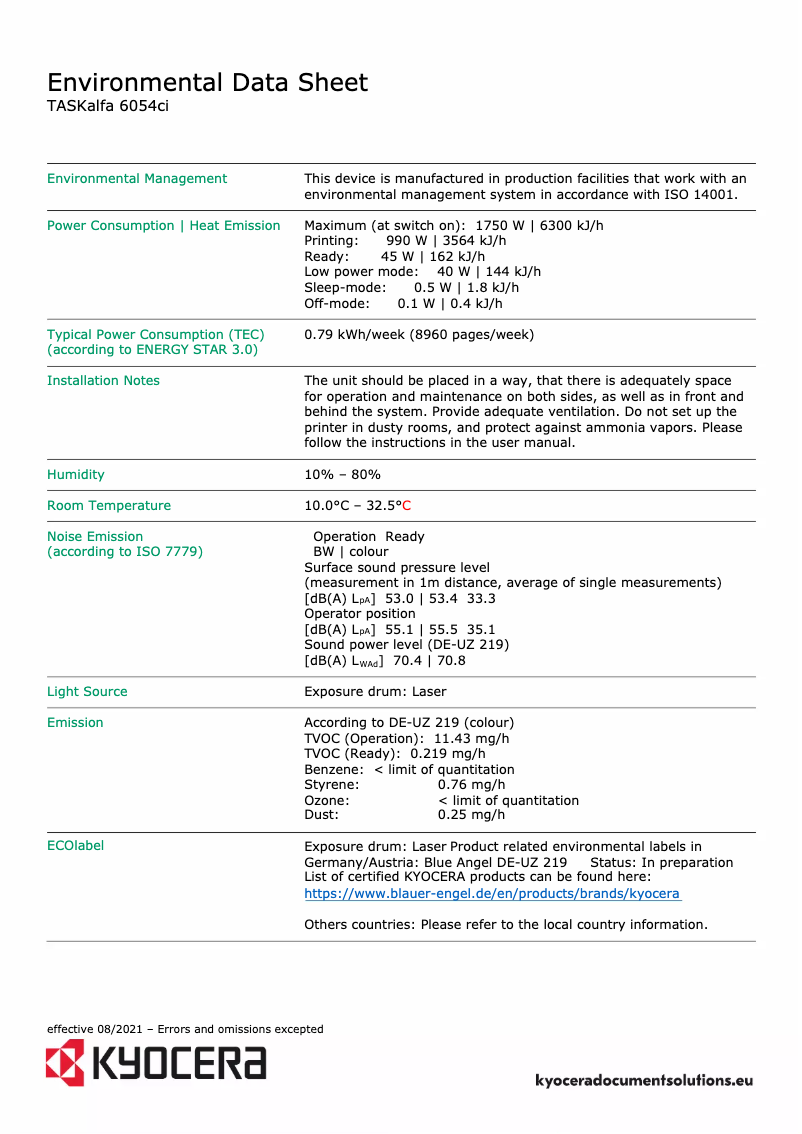
The energy-saving technology helps reduce operational costs while being environmentally friendly.
Advantages
High-quality prints and vibrant colors
Durable performance for demanding environments
User-friendly interface and intuitive navigation
Printing, copying, scanning in one device
Energy-efficient and environmentally friendly technology
Disadvantages
High initial purchase cost.
Bulk requiring adequate space.
High maintenance and consumable costs.
Complex setup for novice users.
Longer first print time.
Technical Specifications TASKalfa 6054ci
General Information
-
ModelTASKALFA 6054CI
-
Brand
-
Category
-
Type
-
SKU1439967
-
MPN1439967
Frequently Asked Questions
How can I remove the paper jammed in the printer?
Why is my printer not recognizing the original cartridges?
What are the possible reasons for poor print quality?
What is the difference between a laser printer and an inkjet printer?
Why is my inkjet printer leaving black streaks?
What does the acronym DPI mean?
Is the manual for the Kyocera TASKalfa 6054ci available in French?
Similar products


More product categories from brand Kyocera
Phones Kyocera
Other Kyocera
More product types from brand Kyocera


Presentation of product TASKalfa 6054ci specifications from brand Kyocera
General Information
The Kyocera TASKalfa 6054ci is a multifunction printer from the Kyocera brand, known for its commitment to quality and innovation in the printing device sector. This model stands out for its remarkable performance and intuitive user interface, thus promising a smooth and pleasant user experience.
Advantages
This printer excels in several areas:
- Exceptional print quality: The TASKalfa 6054ci produces sharp prints with vibrant colors, ideal for professional documents requiring a polished presentation.
- Reliable performance: Designed for demanding work environments, it ensures increased durability and seamless operation, thus minimizing downtime.
- Ease of use: Its user-friendly interface allows users to easily navigate through the various features, making printing and scanning simple and accessible.
- Versatility: This device supports various formats and media, allowing printing, copying, scanning, and sending documents from a single piece of equipment.
- Energy efficiency: Equipped with advanced technologies, the TASKalfa 6054ci is designed to reduce energy consumption, thus helping to lower operating costs while being environmentally friendly.
Disadvantages
However, some aspects may pose challenges:
- The initial purchase cost may be a barrier for small businesses or users with a limited budget.
- Due to its size, this printer can be relatively bulky, requiring appropriate workspace for installation.
- The maintenance and consumables costs (toner, paper, etc.) can add up, leading to additional expenses in the long run.
- The setup and networking can be complicated for less experienced users, potentially requiring technical support.
- The first print output time may be longer compared to other models, which could affect productivity in high-volume printing environments.


