

Manual of product GIC220U
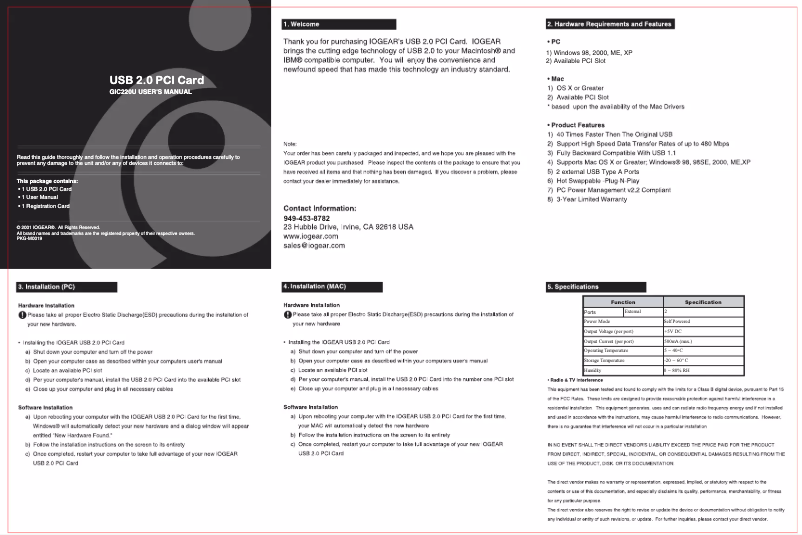
Editorial note
The iogear GIC220U stands out for its convenient connectivity and ease of use. Thanks to its Plug and Play functionality, installation becomes a breeze, providing a generally positive user experience. Additionally, the wireless connection allows for flexible use, freeing users from the constraints of cables. However, some drawbacks deserve to be highlighted. The product is not compatible with Mac operating systems, which may limit its appeal to a number of users. While the transfer rate of 480 Mbps is satisfactory for everyday tasks, it may prove insufficient for demanding applications such as high-definition streaming. Furthermore, the limited number of USB 2.0 ports (two in total) may pose a problem for those looking to connect multiple devices simultaneously. In terms of performance, the product offers a fair value for money, but it is important to consider these potential limitations. For users of Windows XP, Vista, and 7, the iogear GIC220U represents an interesting option, but those considering upgrading their operating system may encounter compatibility issues.Score details
User experience
The user experience is generally positive thanks to the Plug and Play feature that makes installation easy, making the use of the product enjoyable.
connectivity
Wireless connectivity is a major asset for this product, allowing flexible use without the constraints of cables, although some users prefer fully wireless solutions.
Performance
The transfer rate of 480 Mbps is sufficient for most tasks, but may be inadequate for demanding applications like high-definition streaming.
compatibility
The product is compatible with several Windows operating systems, but its lack of compatibility with Mac limits its use for some users.
Value for money
The value for money is fair, but the limitation to two USB ports can be a drawback for users who need to connect multiple devices simultaneously.
Advantages
Convenient wireless connection
Fast 480 Mbps speed
Easy Plug and Play installation
Compatible with multiple operating systems
Two USB 2.0 ports for connectivity
Disadvantages
Not compatible with Mac systems
480 Mbps speed insufficient for streaming
Wired connection limits flexibility
Only two USB 2.0 ports available
Compatible only with Windows XP to 7
Technical Specifications GIC220U
General Information
-
ModelGIC220U
-
Brand
-
Category
-
Type
-
SKU1434773
-
MPN1434773
Other features
-
Connectivity technologyWith cable
-
Compatible operating systemsWindows98SE, 2000, ME, XP, MAC OS 8.6 - 9.2 (USB 1.1), OS X.0.3
-
Data transfer rate480 Mbps
-
Mac CompatibilityYes
Connectivity
-
Host interfacePCI
-
Quantity of USB 2.0 Ports2
Features
-
Plug and PlayYes
Frequently Asked Questions
Is the iogear GIC220U manual available in French?
Similar products


More product categories from brand iogear
More product types from brand iogear


Presentation of product GIC220U specifications from brand iogear
General Information
The iogear GIC220U is a product from the iogear brand, known for its innovation and quality in the electronics sector. This model offers optimal performance, ensuring an enriching user experience. The EAN code, 0672792500435 and 0683728164270, uniquely identifies this product in distribution systems.
Other Features
The iogear GIC220U is designed with wired connectivity technology, allowing practical use without the constraints of cables. It is compatible with several operating systems, including Windows XP, Windows Vista, and Windows 7, thus ensuring smooth usage. Its data transfer rate reaches 480 Mbps, providing fast and efficient communication for daily needs. It is important to note that this product is not compatible with Mac systems.
Connectivity
This model features a wireless host interface, facilitating a flexible connection. Additionally, it offers two USB 2.0 ports, allowing for the efficient and quick connection of multiple devices.
Features
The iogear GIC220U benefits from Plug and Play functionality, allowing for simple and quick installation, making its use even more enjoyable.
Advantages and Disadvantages
Advantages:
- Convenient connectivity thanks to its wireless technology, offering flexibility and freedom of use.
- A transfer rate of 480 Mbps, ensuring fast data exchanges.
- Easy installation due to Plug and Play functionality, eliminating setup hassles.
- Wide compatibility with several Windows operating systems.
- Two USB 2.0 ports, allowing simultaneous connection of multiple devices.
Disadvantages:
- Not compatible with Mac operating systems, limiting its use for some users.
- The transfer rate, while satisfactory, may not be suitable for applications requiring higher speeds.
- Dependence on a specific operating system may pose issues for those wishing to upgrade their system.


