

Manual of product HL-L8230CDW
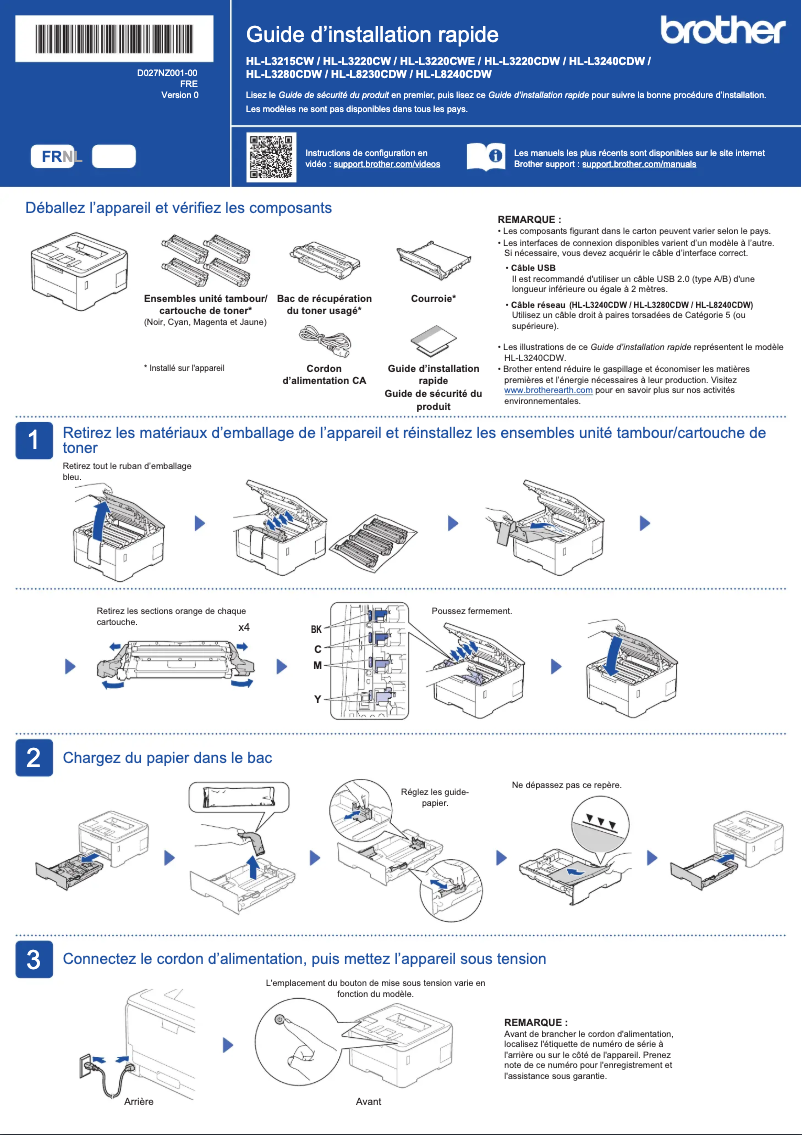
Editorial note
The Brother HL-L8230CDW printer stands out with its remarkable printing speed of 30 pages per minute, both in color and black, making it an ideal choice for intensive professional use. Its LED printing technology ensures optimal print quality, guaranteeing clear and precise results for all your documents. Its intuitive user interface, thanks to a touchscreen, makes navigation and configuration of printing settings easy, enhancing the user experience. Additionally, Wi-Fi connectivity allows for wireless printing from various devices, providing appreciated flexibility. However, the printer has some drawbacks. Duplex printing is manual, which may be less convenient for users looking for automatic double-sided printing. Furthermore, its weight of 16.7 kg can make moving the device difficult, especially in tight spaces. The maximum resolution of 600 x 600 DPI may also prove insufficient for high-quality prints, such as complex images. Finally, the lack of Ethernet/LAN connectivity and the limited number of paper trays may restrict its use in more demanding business environments. In summary, while the Brother HL-L8230CDW offers solid performance and useful features, it is important to consider its limitations to ensure it meets the specific needs of your work environment.Score details
User experience
The user interface is intuitive thanks to the touchscreen, making navigation and printer settings configuration easier.
Performance
The printing speed of 30 pages per minute in color and black is impressive, ideal for intensive professional use.
Features
Manual duplex printing and Wi-Fi connectivity add useful features, although the lack of automatic duplex printing is a drawback.
Design
Weighing 16.7 kg makes the printer difficult to move, which can be problematic in tight spaces.
Value for money
Although the print quality is good, the maximum resolution of 600 x 600 DPI may be insufficient for high-quality prints.
Robustness
The limited number of paper trays and the absence of Ethernet/LAN connectivity may restrict usability flexibility in business environments.
Advantages
Print speed of 30 pages per minute
Manual duplex printing to save paper
LED technology for superior print quality
Wi-Fi connectivity for wireless use
Touchscreen for easy navigation
Disadvantages
Manual duplex printing is inconvenient.
Weight of 16.7 kg makes it difficult to move.
Resolution of 600 x 600 DPI is limited.
No Ethernet/LAN connectivity available.
Only one paper tray available.
Technical Specifications HL-L8230CDW
General Information
-
ModelHL-L8230CDW
-
Brand
-
Category
-
Type
-
SKU1874238
-
MPN1874238
Print speed
-
Double-sided printingYes
-
Printing technologyLED
-
Print speed (color, normal quality, A4/US Letter)30 ppm
-
Print speed (color, normal quality, A4/US Letter)30 ppm
-
Double-sided printingYes
-
Duplex printing modeAuto
-
Maximum resolution600 x 600 DPI
-
Copy time for the first page (Black, normal)12.5 s
Design
-
Built-in screenYes
-
Order typeTactile
-
Product colorWhite
-
Market positionProfessional
Representation / realization
-
Internal memory512 MB
Paper management
-
Maximum ISO A series paper sizeA4
-
ISO, Format Series A (A0...A9)A4, A5, A6
-
Non-ISO print support sizesExecutive (184 x 267mm), Folio (media size), Legal (media size), Letter (media size)
-
Type of paper tray supportEnvelopes, Plain paper, Recycled paper, Thick paper, Thin paper
-
Envelope sizesC5, Com-10, DL, Monarch
-
JIS series B format (B0...B9)B5
Connectivity
-
Direct printing-
-
USB portYes
-
Quantity of USB 2.0 Ports1
Network
-
Contactless paymentYes
-
Ethernet/LANNo
-
Wifi standards802.11b, 802.11g, Wi-Fi 4 (802.11n)
-
Security-supported algorithm64-bit WEP, 128-bit WEP, WPA-AES, WPA-PSK, WPA-TKIP, WPA2-AES, WPA2-PSK, WPA2-TKIP, WPA3-EAP, WPA3-SAE
-
Contactless paymentYes
Weight and dimensions
-
Width399 mm
-
Depth446 mm
-
Height274 mm
-
Weight16700 g
Packaging information
-
Package width488 mm
-
Package depth535 mm
-
Package height370 mm
-
Package weight19700 g
Power
-
Average power consumption in Print mode560 W
-
Energy consumption (loan)70 W
-
Electricity consumption (stop)0.04 W
Input and output capacity
-
Total number of power supply units1
-
Total power capacity250 sheets
-
Total output capacity150 sheets
Features
-
Languages of the page descriptionBR-Script 3
-
Service cycle (Maximum)PCL 5c
-
Printing colorsPCL 5e
-
Number of print cartridgesPCL 6
-
PDF 1.7
-
- pages per month
-
Black
-
Cyan
-
Magenta
-
Yellow
-
2
Frequently Asked Questions
What is the weight of the Brother HL-L8230CDW printer?
What is the recommended method for removing paper jammed in the printer?
Why is my printer not recognizing the original cartridges?
What could be the reasons for poor print quality?
What is the difference between a laser printer and an inkjet printer?
Why is my inkjet printer producing black lines?
What does the acronym DPI mean?
How many cartridges can be installed in the Brother HL-L8230CDW?
What is the height of the Brother HL-L8230CDW printer?
What is the width of the Brother HL-L8230CDW printer?
What is the depth of the Brother HL-L8230CDW printer?
Is the manual for the Brother HL-L8230CDW available in French?
Similar products


More product categories from brand Brother
Home appliances Brother
Other Brother
Tools Brother
Phones Brother
Interior Brother
More product types from brand Brother


Presentation of product HL-L8230CDW specifications from brand Brother
General Information
The Brother HL-L8230CDW printer is a well-known model from the Brother brand, recognized for its quality and innovation in the office equipment sector. This model ensures high performance and a satisfying user experience. The EAN code 4977766823814 allows for unique identification in the distribution network.
Print Speed
This model supports color and black printing, offering a print speed of 30 pages per minute (ppm) for A4/US Letter formats. Thanks to LED printing technology, it guarantees optimal quality with precise results. The printer supports duplex printing, although it is manual, which contributes to more economical resource management. Its maximum resolution is 600 x 600 DPI, allowing for clear and professional prints. The first page print time in black is only 12.5 seconds, which is ideal for dynamic work environments.
Design
The Brother HL-L8230CDW is equipped with a built-in touchscreen, making it easy to navigate and configure print settings. Its sleek white design gives it a modern look, while its features are particularly suited to the needs of professionals.
Performance / Execution
The internal memory of 512 MB allows for smooth and efficient operation, facilitating the management of complex print tasks.
Paper Management
This model supports a maximum paper size of A4 and is compatible with several standard formats such as A4, A5, and A6. It can also print on non-standard media like Executive, Folio, Legal, and Letter. The paper tray is designed to accept various types of media, including envelopes, recycled paper, and thick or thin papers. Compatible envelope sizes include C5, Com-10, DL, and Monarch, providing flexibility in use.
Connectivity
The Brother HL-L8230CDW features a USB 2.0 port for quick connection to various devices. Although it does not have Ethernet/LAN connectivity, it allows for wireless printing via Wi-Fi, ensuring a stable and fast connection for all your devices.
Network
This printer offers Wi-Fi connectivity compliant with 802.11b, 802.11g, and 802.11n standards, ensuring a reliable wireless connection. In terms of security, it supports several encryption algorithms, such as WPA2, to protect your data. Additionally, it offers the ability to perform transactions via a contactless payment system.
Weight and Dimensions
With dimensions of 399 mm in width, 446 mm in depth, and 274 mm in height, the Brother HL-L8230CDW is designed to easily fit into your workspace. However, its weight of 16.7 kg may complicate its relocation.
Packaging Information
The package of the Brother HL-L8230CDW measures 488 mm in width, 535 mm in depth, and 370 mm in height, with a total weight of 19.7 kg, ensuring adequate protection during transport.
Power
The power consumption in print mode is 560 W, while in standby mode, it is 70 W. In off mode, the consumption is reduced to 0.04 W, contributing to more energy-efficient use.
Input and Output Capacity
The Brother HL-L8230CDW is equipped with a paper tray with a capacity of 250 sheets, allowing for the management of a substantial volume of documents. Its output capacity is 150 sheets, which is sufficient for daily printing needs.
Features
This model is compatible with several page description languages, such as BR-Script 3, PCL 5c, PCL 5e, PCL 6, and PDF 1.7. Its maximum monthly duty cycle meets the demands of intensive use. The print colors include black, cyan, magenta, and yellow, ensuring high-quality output. Finally, it is designed to operate with two print cartridges, optimizing the cost of consumables.


