

Manual of product HL-L6210DWT
Editorial note
The Brother HL-L6210DWT printer stands out for its exceptional print quality, delivering sharp and professional documents, making it an ideal choice for offices and important presentations. Its high paper capacity reduces interruptions related to reloading, thus optimizing workflow. Additionally, the integration of advanced features like automatic duplex printing contributes to paper savings and more efficient use. However, the initial purchase cost may be a barrier for some users, especially in comparison to other models in the same category. Furthermore, the lack of scanning and copying features limits its use for those seeking an all-in-one solution. The toner cartridges, while high quality, can also prove expensive to replace, increasing long-term operating costs. It is worth noting that the printer can be noisy during operation, which could be disruptive in a quiet work environment. In terms of user experience, although the print quality and reliability of the Brother brand are appreciated, the setup software may pose challenges for less experienced users. Additionally, the user manual, while available, could benefit from more details to facilitate onboarding. Overall, the Brother HL-L6210DWT is a high-performing and reliable printer, but it may require an initial investment and higher operating costs, which should be considered when making a purchase.Score details
User experience
The user experience is generally positive, although the setup software can be complex for less experienced users.
Performance
The print quality is excellent, providing sharp and professional prints suitable for important documents.
Design
The design is functional and suitable for an office environment, although the printer can be noisy during printing.
Value for money
The initial purchase cost is relatively high, and the toner cartridges can increase the long-term operating cost.
Features
The advanced features, such as automatic duplex printing, are appreciated, but the lack of scanning and copying limits its use.
Support
Brother is known for the reliability of its products, providing good peace of mind to users.
Documentation
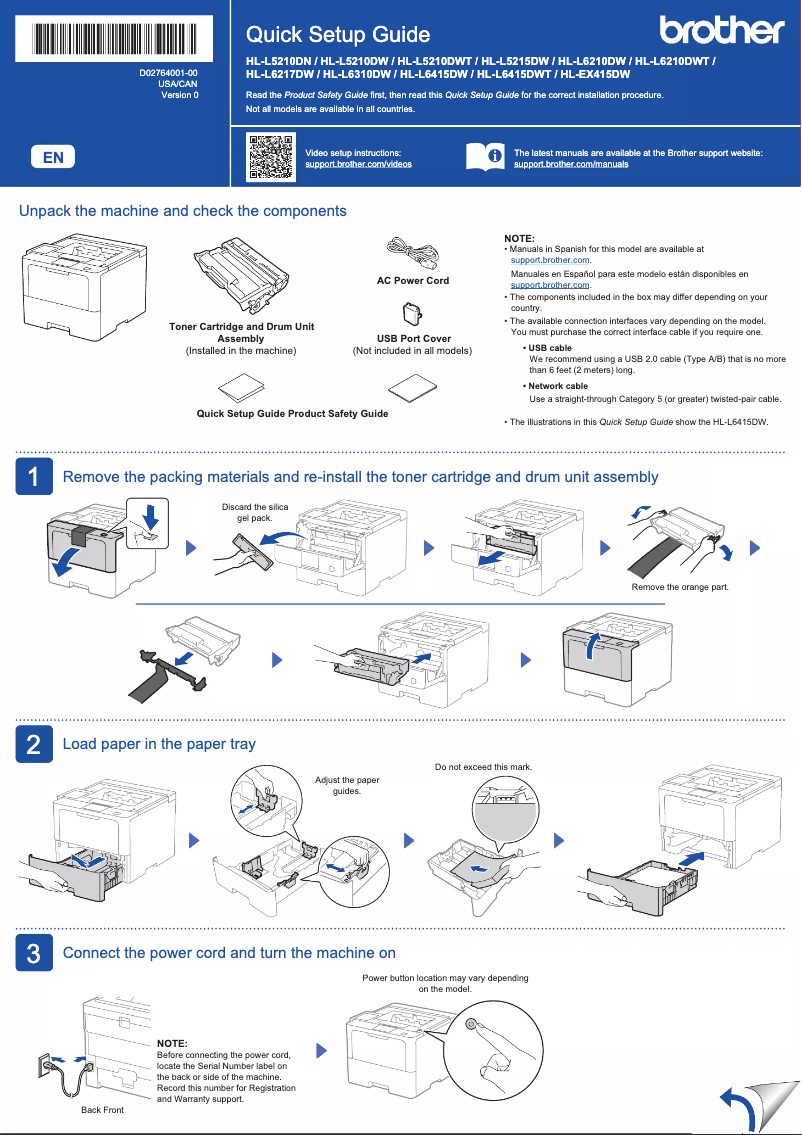
The user manual is available but could be more detailed to facilitate setup and use.
Advantages
Clear and professional printing
Energy saving and environmentally friendly
Large paper tray for fewer interruptions
Built-in automatic duplex printing
Well-known brand for its reliability
Disadvantages
High purchase cost compared to competitors.
No scanning or copying function.
Expensive toner cartridges to replace.
Noisy during printing.
Complex software setup for beginners.
Technical Specifications HL-L6210DWT
General Information
-
ModelHL-L6210DWT
-
Brand
-
Category
-
Type
-
SKU1858088
-
MPN1858088
Frequently Asked Questions
What is the best method to remove a jammed paper from the printer?
Why does my printer not recognize the original cartridges?
What could be the causes of poor print quality?
How does a laser printer differ from an inkjet printer?
Why does my inkjet printer leave black streaks on prints?
What does the acronym DPI mean?
Is the manual for the Brother HL-L6210DWT available in French?
Similar products


More product categories from brand Brother
Home appliances Brother
Other Brother
Tools Brother
Phones Brother
Interior Brother
More product types from brand Brother


Presentation of product HL-L6210DWT specifications from brand Brother
General Information
The Brother HL-L6210DWT is a monochrome laser printer from the Brother brand, known for its excellence and innovation in the printing device sector. This model, the HL-L6210DWT, is designed to deliver exceptional performance, ensuring a smooth and efficient user experience.
Advantages
This printer stands out for its remarkable print quality, providing sharp and professional results, perfect for important documents or presentations. Its energy efficiency helps reduce operating costs while minimizing its environmental impact. Additionally, its high paper capacity limits interruptions due to reloading, which is particularly advantageous in busy office environments.
The HL-L6210DWT model also offers advanced features, such as automatic duplex printing, thus facilitating paper savings and workflow optimization. By choosing Brother, users benefit from the reliability of a brand recognized for the durability of its products, providing peace of mind.
Disadvantages
However, a few disadvantages must be considered. First, the initial purchase cost may be higher than that of other similar laser printers. Moreover, the lack of scanning and copying features limits its use for those seeking an all-in-one solution. The toner cartridges can also incur high replacement costs, thus increasing long-term operating expenses.
Finally, the printer may prove to be noisy during printing, which could be disruptive in quiet work environments. The setup software may also be complex, requiring some learning time for less experienced users.


