

Manual of product HL-L2460DN
Editorial note
The Brother HL-L2460DN is a laser printer that stands out for its impressive printing speed of 34 pages per minute and its maximum resolution of 1200 x 1200 DPI, ensuring high-quality prints, ideal for demanding work environments. Additionally, its duplex printing feature and economical printing help reduce operating costs while preserving the environment. This printer is also designed for practical use with an Ethernet port that ensures a stable network connection, although the lack of Wi-Fi connectivity may limit usage flexibility. Its compact design makes it easy to integrate into various workspaces, but its weight of 6000 g could pose challenges for those who wish to move it frequently. However, some drawbacks are worth mentioning. The duplex printing mode being manual may slow down the printing process for users with frequent needs in this area. Furthermore, the included cartridge capacity of 700 pages may require frequent replacements for high-volume printing users, which could increase long-term costs. In terms of user experience, the interface is intuitive and the features are practical, although the manual duplex printing mode may bring some frustration. The product comes with a clear user manual and a quick installation guide, making setup easy. Overall, the Brother HL-L2460DN is a high-performing and economical printer, but users should be aware of its limitations in connectivity and cartridge management.Score details
User experience
The user experience is generally satisfactory, with an intuitive interface and practical features, although the manual duplex printing mode may slow down usage.
Performance
With a printing speed of 34 pages per minute and a resolution of 1200 x 1200 DPI, the performance is excellent for demanding work environments.
Design
The design is compact and allows for easy integration into various workspaces, although its weight of 6000 g may pose mobility issues.
Value for money
Although the printer offers good performance and eco-friendly features, the capacity of the included cartridge may require frequent replacements, thus increasing long-term costs.
Features
Features such as duplex printing and Ethernet connectivity are appreciated, but the lack of Wi-Fi limits connectivity options.
Support
The product comes with a clear user manual and a quick installation guide, making setup easy.
Advantages
Fast printing: 34 pages per minute.
Economical: double-sided printing to reduce costs.
High resolution: 1200 x 1200 DPI.
Stable network connectivity via Ethernet.
Compact design for small spaces.
Disadvantages
No Wi-Fi connectivity.
Manual duplex printing.
Weight of 6000 g, difficult to move.
700-page cartridge, frequent replacements.
Noise level of 49 dB.
Technical Specifications HL-L2460DN
General Information
-
ModelHL-L2460DN
-
Brand
-
Category
-
Type
-
SKU1867076
-
MPN1867076
Representation / realization
-
Internal memory128 MB
-
Sound pressure level (impression)49 dB
-
Sound power level (impression)66.5 dB
Print speed
-
ColorNo
-
Maximum resolution1200 x 1200 DPI
-
Printing technologyLaser
-
Print speed (black, normal quality, A4/US Letter)34 ppm
-
Copy time for the first page (Black, normal)8.5 s
-
Booklet printing functionYes
-
Booklet printing functionYes
-
Duplex printing speed (Black, normal quality, A4/US Letter)16 ppm
-
Duplex printing modeAuto/Manual
-
Booklet printing functionYes
-
Layout option2, 4, 6, 8, 9, 16, 20, 25
-
Booklet printing functionYes
Weight and dimensions
-
Weight6000 g
-
Height183 mm
-
Width356 mm
-
Depth360 mm
Features
-
Languages of the page description-
-
Number of print cartridges1
-
Service cycle (Maximum)35000 pages per month
-
Printing colorsBlack
Environmental conditions
-
Operating relative humidity (H-H)20 - 80 %
-
Temperature out of operation0 - 40 °C
-
Operating temperature10 - 32.5 °C
-
Relative humidity rate (storage)35 - 80 %
Packaging information
-
Package weight8200 g
-
Package depth283 mm
-
Package height519 mm
-
Package width438 mm
Network
-
Ethernet/LANYes
-
WifiNo
-
Mobile printing technologiesBrother iPrint & Scan
-
Wiring technology10/100Base-T(X)
Design
-
Product colorBlack
-
Built-in screenYes
-
Market positionDomestic and professional
Packaging contents
-
Cables includedSector
-
Cartridge(s) includedYes
-
Cartridge(s) includedYes
-
Cartridge(s) includedYes
-
Cartridge(s) includedYes
-
Included cartridge capacity (black)700 pages
Power
-
Electricity consumption (stop)0.08 W
-
Energy consumption (standby mode)43 W
-
Average power consumption in Print mode470 W
-
Energy Star, typical electrical consumption (TEC)0.37 kWh/week
-
AC input frequency50/60 Hz
-
AC input voltage220 - 240 V
Connectivity
-
USB portYes
-
USB portYes
Paper management
-
Envelope sizesC5
-
ISO, Format Series A (A0...A9)Com-10
-
ISO, Formats Series-B (B0...B9)DL
-
Weight of the multifunctional tray supportMonarch
-
Support width customizationA4
-
Customization of support lengthA5
-
Maximum ISO A series paper sizeA6
-
Type of paper tray supportB5
-
Weight of paper tray supportB6
-
60 - 230 g/m²
-
76.2 - 215.9 mm
-
127 - 355.6 mm
-
A4
-
Bond paper
-
Envelopes
-
Labels
-
Plain paper
-
Recycled paper
-
Thick paper
-
Thin paper
-
60 - 163 g/m²
Minimum system requirements
-
Support for the Windows operating systemWindows 11
-
Support for the Linux operating systemYes
Input and output capacity
-
Total number of power supply units1
-
Total power capacity251 sheets
-
Total output capacity150 sheets
Frequently Asked Questions
What is the weight of the Brother HL-L2460DN printer?
What is the recommended method for removing a jammed paper from the printer?
Why is my printer not recognizing the original cartridges?
What are the possible reasons for poor print quality?
How does a laser printer differ from an inkjet printer?
Why does my inkjet printer leave black streaks on prints?
What does the acronym DPI mean?
How many cartridges can be installed in the Brother HL-L2460DN?
What is the height of the Brother HL-L2460DN printer?
What is the width of the Brother HL-L2460DN printer?
What is the depth of the Brother HL-L2460DN printer?
Is the manual for the Brother HL-L2460DN available in French?
Similar products


More product categories from brand Brother
Home appliances Brother
Other Brother
Tools Brother
Phones Brother
Interior Brother
More product types from brand Brother


Presentation of product HL-L2460DN specifications from brand Brother
General Information
The Brother HL-L2460DN is a monochrome printer from Brother, renowned for its reliability and innovation in the printing equipment sector. This model is designed to deliver optimal performance, thereby enhancing the user experience in various environments, whether domestic or professional.
Representation / Realization
Equipped with 128 MB of internal memory, the Brother HL-L2460DN allows for smooth data and application management, ensuring efficient use. Its sound pressure level of 49 dB during printing makes it an ideal choice for workspaces where noise must be minimized. Additionally, the sound power level of 66.5 dB ensures pleasant operation without excessive disturbances.
Print Speed
This printer produces only black prints, with a maximum resolution of 1200 x 1200 DPI, ensuring exceptional clarity for all your documents. Its laser printing technology guarantees optimal quality with an impressive print speed of 34 pages per minute (ppm) and a first print out time of just 8.5 seconds. Furthermore, the Brother HL-L2460DN offers economical printing and a duplex mode, although the latter is manual, allowing for optimized use of paper resources. It is also capable of handling booklet printing and adding watermarks for enhanced security.
Weight and Dimensions
Weighing 6000 g, the Brother HL-L2460DN is relatively easy to handle despite its size. It measures 183 mm in height, 356 mm in width, and 360 mm in depth, allowing it to fit easily into various workspaces.
Features
This printer operates with a single cartridge and is designed for a maximum service cycle of 35,000 pages per month, thus meeting the needs of high-volume printing users. Its print color is black, ensuring high-quality visual output.
Environmental Conditions
The Brother HL-L2460DN operates efficiently in a relative humidity of 20 to 80% and can withstand temperatures from 0 to 40 °C externally and from 10 to 32.5 °C during operation. These specifications ensure its durability and reliability in various environments.
Packaging Information
The total weight of the packaging for the Brother HL-L2460DN is 8200 g, with dimensions of 283 mm in depth, 519 mm in height, and 438 mm in width, thus ensuring adequate protection during transport.
Network
The Brother HL-L2460DN is equipped with an Ethernet port for stable network connectivity, although it does not have Wi-Fi. It also supports various mobile printing technologies, providing flexibility in use.
Design
Its sleek black design integrates harmoniously into any work environment. The printer also features a built-in display, making it easy to use and control.
Contents of the Package
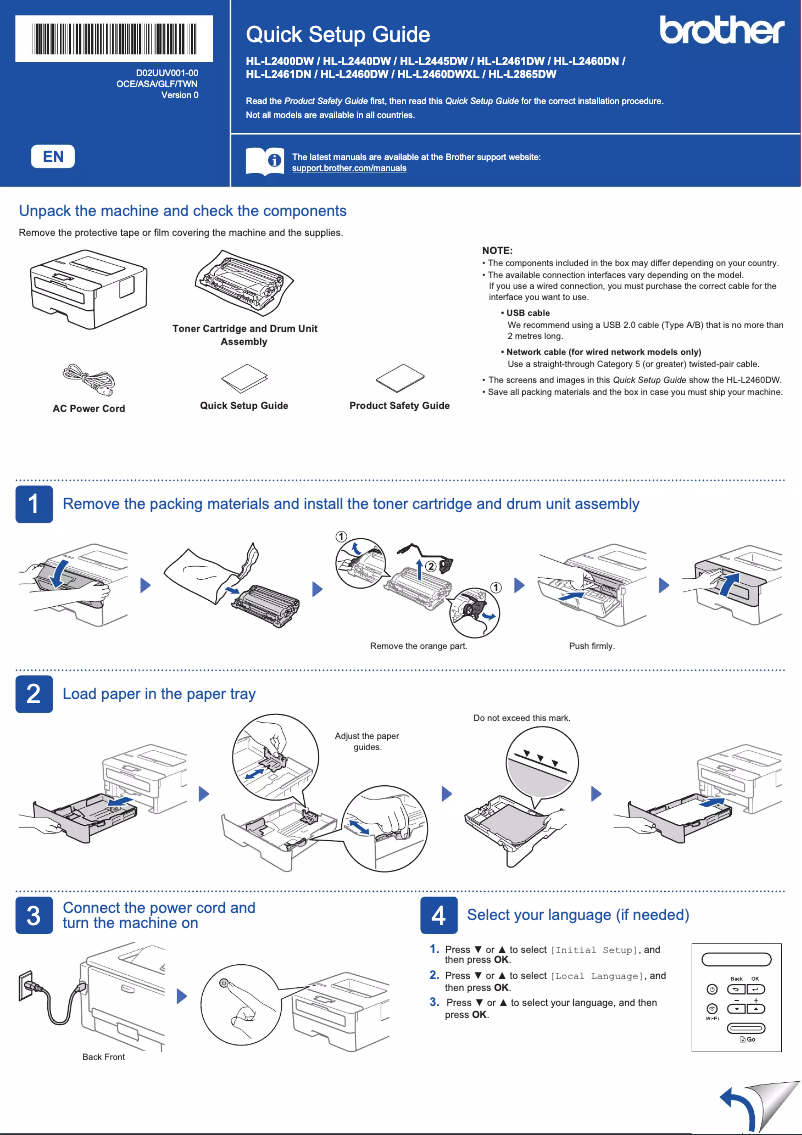
In the package, you will find a power cable, a user manual, a warranty card, and a quick installation guide. Additionally, a print cartridge is included, with a capacity of approximately 700 pages, allowing for immediate use.
Power
The power consumption of the Brother HL-L2460DN is 0.08 W when off, 43 W in standby mode, and 470 W in print mode. It has a typical power consumption of 0.37 kWh per week, ensuring energy efficiency.
Connectivity
This printer features a USB port for a simple and direct connection, as well as a direct printing function for quick access to printing from your devices.
Paper Management
The Brother HL-L2460DN supports multiple paper sizes, including A4, A5, as well as various envelope formats, and it can handle paper weights ranging from 60 to 230 g/m². Its input capacity is 251 sheets, and it can output up to 150 sheets, ensuring optimal performance for your printing needs.
Minimum System Requirements
This printer is compatible with Windows 11 as well as Linux operating systems, providing great flexibility for users.
Input and Output Capacity
The Brother HL-L2460DN is equipped with a single feed tray, allowing for efficient management of your prints. Its maximum input capacity is 251 sheets, while its output capacity is 150 sheets, thus meeting frequent printing needs.


